Building a Private, AI-Driven YouTube Knowledge Base
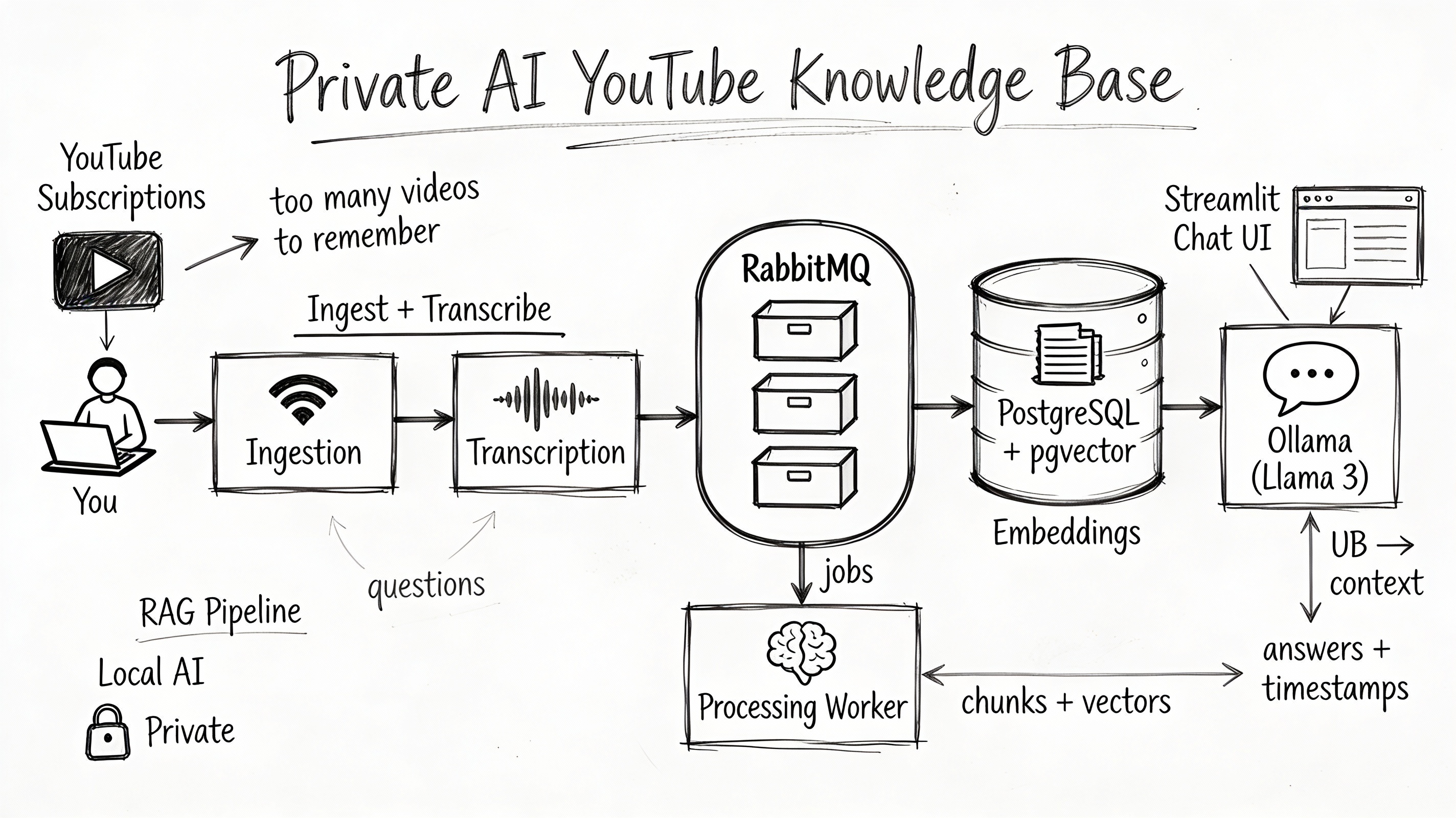
For IT professionals and developers, YouTube has evolved from an entertainment platform into a primary source of continuous education. We rely on it for everything from architectural patterns and cloud infrastructure tutorials to debugging sessions and conference talks.
However, video is inherently opaque data. Unlike documentation or code repositories, you cannot "Ctrl+F" your way through thousands of hours of video history to find that one specific explanation of a concept you watched six months ago. We face a significant gap between content consumption and knowledge retention.
The Problem: The Unsearchable Archive
As we accumulate subscriptions, we build a massive library of potential knowledge that remains largely inaccessible. The challenges are structural:
- The "Black Box" of Video — Valuable technical insights are often buried deep within long-form content, invisible to standard metadata searches.
- Fragmentation — Knowledge is siloed across hundreds of channels with no unified way to cross-reference topics (e.g., comparing how three different channels handle Kubernetes networking).
- Ephemeral Recall — We watch a solution once, but without a text-based index, retrieving that solution during a future incident is nearly impossible.
The Solution: A Private RAG Engine
In this guide, we are going to build a solution to shift from passive consumption to active conversation. We will build a Retrieval Augmented Generation (RAG) system that treats your YouTube subscriptions as a private dataset.
By leveraging LangChain and Ollama locally, we can create a system that lets you chat with your video history. You can ask, "How does NetworkChuck explain VLANs?" and the system will not only find the video but synthesize an answer based on the transcript.
Core Architecture
To turn this concept into reality, we will adopt a microservices approach using Docker. At a high level, the pipeline involves five stages:
- Ingestion — A service autonomously monitors your subscriptions for new content.
- Transcription — Using Whisper, the system converts unstructured audio into timestamped text.
- Indexing — The system chunks transcripts and processes them through an embedding model (
nomic-embed-text), storing the vectors in PostgreSQL. - Retrieval — Your questions are converted into vectors to find relevant transcript segments.
- Synthesis — Llama 3 reads the retrieved context and generates a precise answer, citing specific video timestamps.
Here is the architecture we will build:
                                  INTERNET (YouTube)
                                      ^     ^
                                      |     |
      (1) User Visits UI              |     | (3) Download Audio (yt-dlp)
      (Browser)                       |     |
          |                           |     |
          v                           |     |
+-----------------------------------------------------------------------+
|  HOST MACHINE (Port 8501)           |     |                           |
+-------------------------------------+-----+---------------------------+
|                                     |     |                           |
|  DOCKER NETWORK (yt-net)            |     |                           |
|                                     |     |                           |
|  +-------------------+       +------+-----+------+                    |
|  |   Streamlit UI    |       | Ingestion Service |                    |
|  | [LangChain Client]|<------|   (The Watcher)   |                    |
|  |                   |       |                   |                    |
|  | Ports: 8501:8501  |       |   [yt-dlp/RSS]    |                    |
|  +--------+-----+----+       +---------+---------+                    |
|           |     |                      |                              |
|           |     | (2) Search           | (4) Push Job                 |
|           |     |     Vector           |     (AMQP)                   |
|           |     v                      v                              |
|           |  +-----------------------------------+                    |
|  (5) Gen  |  |            RabbitMQ               |                    |
|   Query   |  |        (Message Broker)           |                    |
|   Embed   |  |                                   |                    |
|   (HTTP)  |  | Ports: 15672:15672 (Mgmt UI)      |                    |
|           |  +-----------------+-----------------+                    |
|           |                    |                                      |
|           |                    | (6) Pull Job                         |
|           |                    |     (AMQP)                           |
|           |                    v                                      |
|           |          +---------+---------+                            |
|           |          | Processing Worker |                            |
|           |          |    (The Brain)    |                            |
|           |          |                   |                            |
|           |          | [faster-whisper]  |                            |
|           |          |     [ffmpeg]      |                            |
|           +--------->|     [yt-dlp]      |                            |
|           ^          +----+---------+----+                            |
|           |               |         |                                 |
|  (9) Chat |      (7) Gen  |         | (8) Store                       |
|      With |      Embed    |         |     Data                        |
|      Data |      (HTTP)   |         |     (SQL)                       |
|           |               v         v                                 |
|  +--------+----------+    +---------+---------+                       |
|  |      Ollama       |    |    PostgreSQL     |                       |
|  |    (AI Model)     |    |   (Data Layer)    |                       |
|  |                   |    |                   |                       |
|  | [nomic-embed-text]|    |    [pgvector]     |                       |
|  |     [llama3]      |    |   [Videos/Subs]   |                       |
|  +-------------------+    +-------------------+                       |
|                                                                       |
+-----------------------------------------------------------------------+
Part 1: The Infrastructure
We will start by defining the "plumbing" of our system using Docker Compose and designing our PostgreSQL database schema to handle vector embeddings.
Folder Structure
Treat this project as a monorepo. Open your terminal and create the following structure:
mkdir yt-rag-engine
cd yt-rag-engine
mkdir database
touch docker-compose.yml .env database/init.sql
mkdir yt-rag-engine
cd yt-rag-engine
mkdir database
touch docker-compose.yml .env database/init.sql
The Docker Compose File
We need to orchestrate three core services:
- PostgreSQL (with pgvector) — to store our data and embeddings.
- RabbitMQ — to manage our background processing queues.
- Ollama — to run our local LLMs (Llama 3 and Nomic Embed).
Open docker-compose.yml and add the following configuration:
version: '3.8'

services:
  # 1. The Database (Postgres + pgvector)
  postgres:
    image: pgvector/pgvector:pg16
    container_name: yt_db
    environment:
      POSTGRES_USER: ${DB_USER}
      POSTGRES_PASSWORD: ${DB_PASS}
      POSTGRES_DB: ${DB_NAME}
    ports:
      - "5432:5432"
    volumes:
      - postgres_data:/var/lib/postgresql/data
      - ./database/init.sql:/docker-entrypoint-initdb.d/init.sql
    networks:
      - yt-net
    healthcheck:
      test: ["CMD-SHELL", "pg_isready -U ${DB_USER} -d ${DB_NAME}"]
      interval: 10s
      timeout: 5s
      retries: 5

  # 2. The Message Broker (RabbitMQ)
  rabbitmq:
    image: rabbitmq:3-management
    container_name: yt_queue
    ports:
      - "5672:5672"   # AMQP protocol
      - "15672:15672" # Management UI
    environment:
      RABBITMQ_DEFAULT_USER: ${RABBIT_USER}
      RABBITMQ_DEFAULT_PASS: ${RABBIT_PASS}
    networks:
      - yt-net
    healthcheck:
      test: ["CMD", "rabbitmq-diagnostics", "-q", "ping"]
      interval: 10s
      timeout: 5s
      retries: 5

  # 3. The AI Server (Ollama)
  ollama:
    image: ollama/ollama:latest
    container_name: yt_ai
    ports:
      - "11434:11434"
    volumes:
      - ollama_models:/root/.ollama
    networks:
      - yt-net
    # Uncomment below to enable GPU support (Nvidia)
    # deploy:
    #   resources:
    #     reservations:
    #       devices:
    #         - driver: nvidia
    #           count: 1
    #           capabilities: [gpu]

volumes:
  postgres_data:
  ollama_models:

networks:
  yt-net:
    driver: bridge
version: '3.8'

services:
  # 1. The Database (Postgres + pgvector)
  postgres:
    image: pgvector/pgvector:pg16
    container_name: yt_db
    environment:
      POSTGRES_USER: ${DB_USER}
      POSTGRES_PASSWORD: ${DB_PASS}
      POSTGRES_DB: ${DB_NAME}
    ports:
      - "5432:5432"
    volumes:
      - postgres_data:/var/lib/postgresql/data
      - ./database/init.sql:/docker-entrypoint-initdb.d/init.sql
    networks:
      - yt-net
    healthcheck:
      test: ["CMD-SHELL", "pg_isready -U ${DB_USER} -d ${DB_NAME}"]
      interval: 10s
      timeout: 5s
      retries: 5

  # 2. The Message Broker (RabbitMQ)
  rabbitmq:
    image: rabbitmq:3-management
    container_name: yt_queue
    ports:
      - "5672:5672"   # AMQP protocol
      - "15672:15672" # Management UI
    environment:
      RABBITMQ_DEFAULT_USER: ${RABBIT_USER}
      RABBITMQ_DEFAULT_PASS: ${RABBIT_PASS}
    networks:
      - yt-net
    healthcheck:
      test: ["CMD", "rabbitmq-diagnostics", "-q", "ping"]
      interval: 10s
      timeout: 5s
      retries: 5

  # 3. The AI Server (Ollama)
  ollama:
    image: ollama/ollama:latest
    container_name: yt_ai
    ports:
      - "11434:11434"
    volumes:
      - ollama_models:/root/.ollama
    networks:
      - yt-net
    # Uncomment below to enable GPU support (Nvidia)
    # deploy:
    #   resources:
    #     reservations:
    #       devices:
    #         - driver: nvidia
    #           count: 1
    #           capabilities: [gpu]

volumes:
  postgres_data:
  ollama_models:

networks:
  yt-net:
    driver: bridge
Environment Variables
Create a .env file to keep secrets safe:
# Database Credentials
DB_USER=admin
DB_PASS=secretpassword
DB_NAME=yt_knowledge_base

# RabbitMQ Credentials
RABBIT_USER=guest
RABBIT_PASS=guest
# Database Credentials
DB_USER=admin
DB_PASS=secretpassword
DB_NAME=yt_knowledge_base

# RabbitMQ Credentials
RABBIT_USER=guest
RABBIT_PASS=guest
Designing the Schema (pgvector)
We need to tell PostgreSQL how to structure our data. The most critical part is enabling the vector extension and defining the embedding column. We are using nomic-embed-text via Ollama, which outputs vectors with 768 dimensions.
Open database/init.sql and add this SQL script:
-- 1. Enable the pgvector extension
CREATE EXTENSION IF NOT EXISTS vector;

-- 2. Channels Table: Who are we watching?
CREATE TABLE IF NOT EXISTS channels (
    id TEXT PRIMARY KEY,             -- YouTube Channel ID (e.g., UC123...)
    name TEXT NOT NULL,
    url TEXT NOT NULL,
    last_checked_at TIMESTAMP DEFAULT '1970-01-01'
);

-- 3. Videos Table: Metadata for individual videos
CREATE TABLE IF NOT EXISTS videos (
    id TEXT PRIMARY KEY,             -- YouTube Video ID (e.g., dQw4w9WgXcQ)
    channel_id TEXT REFERENCES channels(id),
    title TEXT NOT NULL,
    url TEXT NOT NULL,
    published_at TIMESTAMP,
    created_at TIMESTAMP DEFAULT CURRENT_TIMESTAMP,
    status TEXT DEFAULT 'pending'    -- pending, processing, completed, error
);

-- 4. Transcripts Table: The searchable content
CREATE TABLE IF NOT EXISTS transcript_chunks (
    id SERIAL PRIMARY KEY,
    video_id TEXT REFERENCES videos(id) ON DELETE CASCADE,

    -- The actual text content (for RAG context)
    chunk_text TEXT NOT NULL,

    -- Timestamps for deep-linking
    start_time DOUBLE PRECISION,
    end_time DOUBLE PRECISION,

    -- The AI "Brain" Part
    -- 768 dimensions matches nomic-embed-text
    embedding vector(768)
);

-- 5. Create a search index for speed (HNSW algorithm)
CREATE INDEX ON transcript_chunks USING hnsw (embedding vector_cosine_ops);
Booting Up and Priming Models
Before writing code, let's bring up the infrastructure and download the AI models.
Start Docker:
docker-compose up -d
docker-compose up -d
Pull models. Ollama starts empty. Execute these commands to pull the models into the persistent volume:
# Pull the Chat Model (for RAG synthesis)
docker exec -it yt_ai ollama pull llama3

# Pull the Embedding Model (for Vectorizing)
docker exec -it yt_ai ollama pull nomic-embed-text
# Pull the Chat Model (for RAG synthesis)
docker exec -it yt_ai ollama pull llama3

# Pull the Embedding Model (for Vectorizing)
docker exec -it yt_ai ollama pull nomic-embed-text
Part 2: The Backend Engine
With the infrastructure running, we will now build the two Python services that power the system: the Ingestion Service (Discovery) and the Processing Worker (Analysis).
Service 1: The Ingestion Service
This service checks RSS feeds and creates "Job Tickets" in RabbitMQ.
Create a folder ingestion_service with a requirements.txt:
pika
psycopg2-binary
feedparser
python-dotenv
The code (ingestion_service/main.py):
import time
import feedparser
import pika
import json
import psycopg2
import os
from datetime import datetime

# Connect to Infrastructure
DB_HOST = "postgres"
RABBIT_HOST = "rabbitmq"
QUEUE_NAME = "transcription_queue"

def get_db_connection():
    return psycopg2.connect(
        host=DB_HOST,
        database=os.environ.get("DB_NAME"),
        user=os.environ.get("DB_USER"),
        password=os.environ.get("DB_PASS")
    )

def publish_to_queue(video_data):
    connection = pika.BlockingConnection(pika.ConnectionParameters(host=RABBIT_HOST))
    channel = connection.channel()
    channel.queue_declare(queue=QUEUE_NAME, durable=True)

    channel.basic_publish(
        exchange='',
        routing_key=QUEUE_NAME,
        body=json.dumps(video_data),
        properties=pika.BasicProperties(delivery_mode=2)  # Make message persistent
    )
    connection.close()

def check_feeds():
    conn = get_db_connection()
    cur = conn.cursor()

    # 1. Get all monitored channels
    cur.execute("SELECT id, url FROM channels")
    channels = cur.fetchall()

    for channel_id, channel_url in channels:
        # YouTube RSS URL format
        rss_url = f"https://www.youtube.com/feeds/videos.xml?channel_id={channel_id}"
        feed = feedparser.parse(rss_url)

        for entry in feed.entries:
            video_id = entry.yt_videoid

            # 2. Check if we already have this video
            cur.execute("SELECT 1 FROM videos WHERE id = %s", (video_id,))
            if cur.fetchone() is None:
                print(f"Found new video: {entry.title}")

                # 3. Add to DB as 'pending'
                cur.execute(
                    "INSERT INTO videos (id, channel_id, title, url, published_at, status) VALUES (%s, %s, %s, %s, %s, 'pending')",
                    (video_id, channel_id, entry.title, entry.link, datetime.now())
                )
                conn.commit()

                # 4. Push to RabbitMQ
                publish_to_queue({
                    "video_id": video_id,
                    "url": entry.link,
                    "title": entry.title
                })

    conn.close()

if __name__ == "__main__":
    print("Ingestion Service Started...")
    while True:
        try:
            check_feeds()
        except Exception as e:
            print(f"Error: {e}")
        time.sleep(3600) # Sleep for 1 hour
import time
import feedparser
import pika
import json
import psycopg2
import os
from datetime import datetime

# Connect to Infrastructure
DB_HOST = "postgres"
RABBIT_HOST = "rabbitmq"
QUEUE_NAME = "transcription_queue"

def get_db_connection():
    return psycopg2.connect(
        host=DB_HOST,
        database=os.environ.get("DB_NAME"),
        user=os.environ.get("DB_USER"),
        password=os.environ.get("DB_PASS")
    )

def publish_to_queue(video_data):
    connection = pika.BlockingConnection(pika.ConnectionParameters(host=RABBIT_HOST))
    channel = connection.channel()
    channel.queue_declare(queue=QUEUE_NAME, durable=True)

    channel.basic_publish(
        exchange='',
        routing_key=QUEUE_NAME,
        body=json.dumps(video_data),
        properties=pika.BasicProperties(delivery_mode=2)  # Make message persistent
    )
    connection.close()

def check_feeds():
    conn = get_db_connection()
    cur = conn.cursor()

    # 1. Get all monitored channels
    cur.execute("SELECT id, url FROM channels")
    channels = cur.fetchall()

    for channel_id, channel_url in channels:
        # YouTube RSS URL format
        rss_url = f"https://www.youtube.com/feeds/videos.xml?channel_id={channel_id}"
        feed = feedparser.parse(rss_url)

        for entry in feed.entries:
            video_id = entry.yt_videoid

            # 2. Check if we already have this video
            cur.execute("SELECT 1 FROM videos WHERE id = %s", (video_id,))
            if cur.fetchone() is None:
                print(f"Found new video: {entry.title}")

                # 3. Add to DB as 'pending'
                cur.execute(
                    "INSERT INTO videos (id, channel_id, title, url, published_at, status) VALUES (%s, %s, %s, %s, %s, 'pending')",
                    (video_id, channel_id, entry.title, entry.link, datetime.now())
                )
                conn.commit()

                # 4. Push to RabbitMQ
                publish_to_queue({
                    "video_id": video_id,
                    "url": entry.link,
                    "title": entry.title
                })

    conn.close()

if __name__ == "__main__":
    print("Ingestion Service Started...")
    while True:
        try:
            check_feeds()
        except Exception as e:
            print(f"Error: {e}")
        time.sleep(3600) # Sleep for 1 hour
The Dockerfile (ingestion_service/Dockerfile):
FROM python:3.9-slim
WORKDIR /app
COPY requirements.txt .
RUN pip install --no-cache-dir -r requirements.txt
COPY . .
CMD ["python", "main.py"]
Service 2: The Processing Worker
This worker converts audio, transcribes it, and embeds it.
Create a folder processing_worker with a requirements.txt:
pika
psycopg2-binary
yt-dlp
faster-whisper
requests
python-dotenv
The code (processing_worker/worker.py):
import pika
import json
import os
import psycopg2
import requests
import yt_dlp
from faster_whisper import WhisperModel

# Config
OLLAMA_API = "http://ollama:11434/api/embeddings"
MODEL_NAME = "nomic-embed-text"
TEMP_DIR = "/app/temp"

# Initialize Whisper (runs on CPU by default, or GPU if passed to Docker)
model = WhisperModel("tiny", device="cpu", compute_type="int8")

def download_audio(video_url, video_id):
    """Downloads audio using yt-dlp to a temp file"""
    output_path = f"{TEMP_DIR}/{video_id}"
    ydl_opts = {
        'format': 'bestaudio/best',
        'outtmpl': output_path,
        'postprocessors': [{'key': 'FFmpegExtractAudio','preferredcodec': 'mp3'}],
        'quiet': True
    }
    with yt_dlp.YoutubeDL(ydl_opts) as ydl:
        ydl.download([video_url])
    return f"{output_path}.mp3"

def get_embedding(text):
    """Calls Ollama to get vector embedding"""
    response = requests.post(OLLAMA_API, json={
        "model": MODEL_NAME,
        "prompt": text
    })
    return response.json()['embedding']

def process_video(ch, method, properties, body):
    data = json.loads(body)
    video_id = data['video_id']
    print(f"Processing: {data['title']}")

    try:
        # 1. Download Audio
        audio_path = download_audio(data['url'], video_id)

        # 2. Transcribe
        segments, _ = model.transcribe(audio_path)

        conn = psycopg2.connect(
            host="postgres",
            database=os.environ.get("DB_NAME"),
            user=os.environ.get("DB_USER"),
            password=os.environ.get("DB_PASS")
        )
        cur = conn.cursor()

        # 3. Chunk & Embed
        chunk_buffer = ""
        start_time = 0.0

        for segment in segments:
            chunk_buffer += segment.text + " "

            # Create a chunk roughly every 500 characters
            if len(chunk_buffer) > 500:
                vector = get_embedding(chunk_buffer)
                cur.execute(
                    """INSERT INTO transcript_chunks
                       (video_id, chunk_text, start_time, end_time, embedding)
                       VALUES (%s, %s, %s, %s, %s)""",
                    (video_id, chunk_buffer, start_time, segment.end, vector)
                )
                chunk_buffer = ""
                start_time = segment.end

        # 4. Mark Complete
        cur.execute("UPDATE videos SET status = 'completed' WHERE id = %s", (video_id,))
        conn.commit()
        conn.close()

        os.remove(audio_path)
        print(f"Done: {data['title']}")
        ch.basic_ack(delivery_tag=method.delivery_tag)

    except Exception as e:
        print(f"Error processing {video_id}: {e}")
        ch.basic_nack(delivery_tag=method.delivery_tag, requeue=False)

# Start Consumer
connection = pika.BlockingConnection(pika.ConnectionParameters("rabbitmq"))
channel = connection.channel()
channel.queue_declare(queue="transcription_queue", durable=True)
channel.basic_qos(prefetch_count=1)
channel.basic_consume(queue="transcription_queue", on_message_callback=process_video)

print("Processing Worker Started...")
channel.start_consuming()
import pika
import json
import os
import psycopg2
import requests
import yt_dlp
from faster_whisper import WhisperModel

# Config
OLLAMA_API = "http://ollama:11434/api/embeddings"
MODEL_NAME = "nomic-embed-text"
TEMP_DIR = "/app/temp"

# Initialize Whisper (runs on CPU by default, or GPU if passed to Docker)
model = WhisperModel("tiny", device="cpu", compute_type="int8")

def download_audio(video_url, video_id):
    """Downloads audio using yt-dlp to a temp file"""
    output_path = f"{TEMP_DIR}/{video_id}"
    ydl_opts = {
        'format': 'bestaudio/best',
        'outtmpl': output_path,
        'postprocessors': [{'key': 'FFmpegExtractAudio','preferredcodec': 'mp3'}],
        'quiet': True
    }
    with yt_dlp.YoutubeDL(ydl_opts) as ydl:
        ydl.download([video_url])
    return f"{output_path}.mp3"

def get_embedding(text):
    """Calls Ollama to get vector embedding"""
    response = requests.post(OLLAMA_API, json={
        "model": MODEL_NAME,
        "prompt": text
    })
    return response.json()['embedding']

def process_video(ch, method, properties, body):
    data = json.loads(body)
    video_id = data['video_id']
    print(f"Processing: {data['title']}")

    try:
        # 1. Download Audio
        audio_path = download_audio(data['url'], video_id)

        # 2. Transcribe
        segments, _ = model.transcribe(audio_path)

        conn = psycopg2.connect(
            host="postgres",
            database=os.environ.get("DB_NAME"),
            user=os.environ.get("DB_USER"),
            password=os.environ.get("DB_PASS")
        )
        cur = conn.cursor()

        # 3. Chunk & Embed
        chunk_buffer = ""
        start_time = 0.0

        for segment in segments:
            chunk_buffer += segment.text + " "

            # Create a chunk roughly every 500 characters
            if len(chunk_buffer) > 500:
                vector = get_embedding(chunk_buffer)
                cur.execute(
                    """INSERT INTO transcript_chunks
                       (video_id, chunk_text, start_time, end_time, embedding)
                       VALUES (%s, %s, %s, %s, %s)""",
                    (video_id, chunk_buffer, start_time, segment.end, vector)
                )
                chunk_buffer = ""
                start_time = segment.end

        # 4. Mark Complete
        cur.execute("UPDATE videos SET status = 'completed' WHERE id = %s", (video_id,))
        conn.commit()
        conn.close()

        os.remove(audio_path)
        print(f"Done: {data['title']}")
        ch.basic_ack(delivery_tag=method.delivery_tag)

    except Exception as e:
        print(f"Error processing {video_id}: {e}")
        ch.basic_nack(delivery_tag=method.delivery_tag, requeue=False)

# Start Consumer
connection = pika.BlockingConnection(pika.ConnectionParameters("rabbitmq"))
channel = connection.channel()
channel.queue_declare(queue="transcription_queue", durable=True)
channel.basic_qos(prefetch_count=1)
channel.basic_consume(queue="transcription_queue", on_message_callback=process_video)

print("Processing Worker Started...")
channel.start_consuming()
The Dockerfile (processing_worker/Dockerfile). Crucially, we install ffmpeg here for audio extraction:
FROM python:3.9-slim
# Install ffmpeg
RUN apt-get update && apt-get install -y ffmpeg && rm -rf /var/lib/apt/lists/*
WORKDIR /app
COPY requirements.txt .
RUN pip install --no-cache-dir -r requirements.txt
# Create temp directory
RUN mkdir -p /app/temp
COPY . .
CMD ["python", "worker.py"]
Part 3: The Control Center (Streamlit)
Finally, we need a UI to manage subscriptions and — most importantly — chat with the data.
Create a folder streamlit_app with a requirements.txt:
streamlit
langchain-community
langchain-core
langchain-ollama
psycopg2-binary
yt-dlp
python-dotenv
The code (streamlit_app/app.py):
import streamlit as st
import psycopg2
import os
import yt_dlp
from langchain_ollama import ChatOllama
from langchain_core.prompts import ChatPromptTemplate
from langchain_core.output_parsers import StrOutputParser

# Config
DB_HOST = "postgres"
DB_NAME = os.environ.get("DB_NAME")
DB_USER = os.environ.get("DB_USER")
DB_PASS = os.environ.get("DB_PASS")
OLLAMA_URL = "http://ollama:11434"

st.set_page_config(page_title="YouTube Knowledge Base", layout="wide")
st.title("AI YouTube Knowledge Base")

# --- DATABASE FUNCTIONS ---
def get_db_connection():
    return psycopg2.connect(
        host=DB_HOST, database=DB_NAME, user=DB_USER, password=DB_PASS
    )

def add_channel(url):
    ydl_opts = {'quiet': True, 'extract_flat': True, 'playlist_end': 0}
    with yt_dlp.YoutubeDL(ydl_opts) as ydl:
        try:
            info = ydl.extract_info(url, download=False)
            channel_id = info.get('channel_id')
            name = info.get('uploader') or info.get('channel')

            conn = get_db_connection()
            cur = conn.cursor()
            cur.execute(
                "INSERT INTO channels (id, name, url) VALUES (%s, %s, %s) ON CONFLICT (id) DO NOTHING",
                (channel_id, name, url)
            )
            conn.commit()
            conn.close()
            return f"Success: Added {name}"
        except Exception as e:
            return f"Error: {str(e)}"

def get_context(query_text):
    """Semantic Search: Vector -> SQL Cosine Similarity"""
    from langchain_ollama import OllamaEmbeddings
    embeddings = OllamaEmbeddings(base_url=OLLAMA_URL, model="nomic-embed-text")
    query_vector = embeddings.embed_query(query_text)

    conn = get_db_connection()
    cur = conn.cursor()
    cur.execute(
        """
        SELECT t.chunk_text, v.title, v.url, t.start_time
        FROM transcript_chunks t
        JOIN videos v ON t.video_id = v.id
        ORDER BY t.embedding <=> %s::vector
        LIMIT 5
        """,
        (str(query_vector),)
    )
    results = cur.fetchall()
    conn.close()
    return results

# --- UI LAYOUT ---
tab1, tab2 = st.tabs(["Chat with Knowledge", "Manage Subscriptions"])

# TAB 1: RAG CHAT
with tab1:
    user_query = st.text_input("Ask a question about your videos:")
    if st.button("Ask AI") and user_query:
        with st.spinner("Thinking..."):
            results = get_context(user_query)
            if not results:
                st.warning("No relevant info found in database.")
            else:
                context_text = ""
                for i, (text, title, url, start) in enumerate(results):
                    context_text += f"\n[Source {i+1}]: {text} (From '{title}')\n"

                # RAG Synthesis
                llm = ChatOllama(base_url=OLLAMA_URL, model="llama3")
                prompt = ChatPromptTemplate.from_template("""
                You are a helpful AI assistant. Answer the user's question based ONLY on the following context.
                If the answer is not in the context, say "I don't know".
                Context: {context}
                Question: {question}
                """)
                chain = prompt | llm | StrOutputParser()
                response = chain.invoke({"context": context_text, "question": user_query})

                st.markdown("### AI Answer")
                st.write(response)

                st.markdown("---")
                st.subheader("Reference Clips")
                for text, title, url, start in results:
                    video_link = f"{url}&t={int(start)}s"
                    st.markdown(f"**[{title}]({video_link})**")
                    st.caption(f"...{text}...")

# TAB 2: MANAGE
with tab2:
    st.header("Add New Channel")
    new_url = st.text_input("Paste Channel URL")
    if st.button("Subscribe"):
        with st.spinner("Resolving Channel..."):
            msg = add_channel(new_url)
            st.write(msg)

    st.header("Active Subscriptions")
    conn = get_db_connection()
    df = conn.cursor()
    df.execute("SELECT name, url, last_checked_at FROM channels")
    rows = df.fetchall()
    for row in rows:
        st.write(f"**[{row[0]}]({row[1]})** - Last Checked: {row[2]}")
    conn.close()
import streamlit as st
import psycopg2
import os
import yt_dlp
from langchain_ollama import ChatOllama
from langchain_core.prompts import ChatPromptTemplate
from langchain_core.output_parsers import StrOutputParser

# Config
DB_HOST = "postgres"
DB_NAME = os.environ.get("DB_NAME")
DB_USER = os.environ.get("DB_USER")
DB_PASS = os.environ.get("DB_PASS")
OLLAMA_URL = "http://ollama:11434"

st.set_page_config(page_title="YouTube Knowledge Base", layout="wide")
st.title("AI YouTube Knowledge Base")

# --- DATABASE FUNCTIONS ---
def get_db_connection():
    return psycopg2.connect(
        host=DB_HOST, database=DB_NAME, user=DB_USER, password=DB_PASS
    )

def add_channel(url):
    ydl_opts = {'quiet': True, 'extract_flat': True, 'playlist_end': 0}
    with yt_dlp.YoutubeDL(ydl_opts) as ydl:
        try:
            info = ydl.extract_info(url, download=False)
            channel_id = info.get('channel_id')
            name = info.get('uploader') or info.get('channel')

            conn = get_db_connection()
            cur = conn.cursor()
            cur.execute(
                "INSERT INTO channels (id, name, url) VALUES (%s, %s, %s) ON CONFLICT (id) DO NOTHING",
                (channel_id, name, url)
            )
            conn.commit()
            conn.close()
            return f"Success: Added {name}"
        except Exception as e:
            return f"Error: {str(e)}"

def get_context(query_text):
    """Semantic Search: Vector -> SQL Cosine Similarity"""
    from langchain_ollama import OllamaEmbeddings
    embeddings = OllamaEmbeddings(base_url=OLLAMA_URL, model="nomic-embed-text")
    query_vector = embeddings.embed_query(query_text)

    conn = get_db_connection()
    cur = conn.cursor()
    cur.execute(
        """
        SELECT t.chunk_text, v.title, v.url, t.start_time
        FROM transcript_chunks t
        JOIN videos v ON t.video_id = v.id
        ORDER BY t.embedding <=> %s::vector
        LIMIT 5
        """,
        (str(query_vector),)
    )
    results = cur.fetchall()
    conn.close()
    return results

# --- UI LAYOUT ---
tab1, tab2 = st.tabs(["Chat with Knowledge", "Manage Subscriptions"])

# TAB 1: RAG CHAT
with tab1:
    user_query = st.text_input("Ask a question about your videos:")
    if st.button("Ask AI") and user_query:
        with st.spinner("Thinking..."):
            results = get_context(user_query)
            if not results:
                st.warning("No relevant info found in database.")
            else:
                context_text = ""
                for i, (text, title, url, start) in enumerate(results):
                    context_text += f"\n[Source {i+1}]: {text} (From '{title}')\n"

                # RAG Synthesis
                llm = ChatOllama(base_url=OLLAMA_URL, model="llama3")
                prompt = ChatPromptTemplate.from_template("""
                You are a helpful AI assistant. Answer the user's question based ONLY on the following context.
                If the answer is not in the context, say "I don't know".
                Context: {context}
                Question: {question}
                """)
                chain = prompt | llm | StrOutputParser()
                response = chain.invoke({"context": context_text, "question": user_query})

                st.markdown("### AI Answer")
                st.write(response)

                st.markdown("---")
                st.subheader("Reference Clips")
                for text, title, url, start in results:
                    video_link = f"{url}&t={int(start)}s"
                    st.markdown(f"**[{title}]({video_link})**")
                    st.caption(f"...{text}...")

# TAB 2: MANAGE
with tab2:
    st.header("Add New Channel")
    new_url = st.text_input("Paste Channel URL")
    if st.button("Subscribe"):
        with st.spinner("Resolving Channel..."):
            msg = add_channel(new_url)
            st.write(msg)

    st.header("Active Subscriptions")
    conn = get_db_connection()
    df = conn.cursor()
    df.execute("SELECT name, url, last_checked_at FROM channels")
    rows = df.fetchall()
    for row in rows:
        st.write(f"**[{row[0]}]({row[1]})** - Last Checked: {row[2]}")
    conn.close()
The Dockerfile (streamlit_app/Dockerfile):
FROM python:3.9-slim
WORKDIR /app
COPY requirements.txt .
RUN pip install --no-cache-dir -r requirements.txt
COPY . .
EXPOSE 8501
CMD ["streamlit", "run", "app.py", "--server.port=8501", "--server.address=0.0.0.0"]
Final Integration: Launch Day
We need to update our docker-compose.yml to include our new Python services. Add the following to the services: block:
  ingestion:
    build: ./ingestion_service
    container_name: yt_ingestion
    environment:
      - DB_HOST=postgres
      - DB_NAME=${DB_NAME}
      - DB_USER=${DB_USER}
      - DB_PASS=${DB_PASS}
    networks:
      - yt-net
    depends_on:
      postgres:
        condition: service_healthy
      rabbitmq:
        condition: service_healthy

  worker:
    build: ./processing_worker
    container_name: yt_worker
    environment:
      - DB_HOST=postgres
      - DB_NAME=${DB_NAME}
      - DB_USER=${DB_USER}
      - DB_PASS=${DB_PASS}
    networks:
      - yt-net
    depends_on:
      postgres:
        condition: service_healthy
      rabbitmq:
        condition: service_healthy
      ollama:
        condition: service_started

  streamlit:
    build: ./streamlit_app
    container_name: yt_ui
    ports:
      - "8501:8501"
    environment:
      - DB_HOST=postgres
      - DB_NAME=${DB_NAME}
      - DB_USER=${DB_USER}
      - DB_PASS=${DB_PASS}
    networks:
      - yt-net
    depends_on:
      postgres:
        condition: service_healthy
      ollama:
        condition: service_started
  ingestion:
    build: ./ingestion_service
    container_name: yt_ingestion
    environment:
      - DB_HOST=postgres
      - DB_NAME=${DB_NAME}
      - DB_USER=${DB_USER}
      - DB_PASS=${DB_PASS}
    networks:
      - yt-net
    depends_on:
      postgres:
        condition: service_healthy
      rabbitmq:
        condition: service_healthy

  worker:
    build: ./processing_worker
    container_name: yt_worker
    environment:
      - DB_HOST=postgres
      - DB_NAME=${DB_NAME}
      - DB_USER=${DB_USER}
      - DB_PASS=${DB_PASS}
    networks:
      - yt-net
    depends_on:
      postgres:
        condition: service_healthy
      rabbitmq:
        condition: service_healthy
      ollama:
        condition: service_started

  streamlit:
    build: ./streamlit_app
    container_name: yt_ui
    ports:
      - "8501:8501"
    environment:
      - DB_HOST=postgres
      - DB_NAME=${DB_NAME}
      - DB_USER=${DB_USER}
      - DB_PASS=${DB_PASS}
    networks:
      - yt-net
    depends_on:
      postgres:
        condition: service_healthy
      ollama:
        condition: service_started
Running the Stack
Build and run:
docker-compose up -d --build
docker-compose up -d --build
- Access the app: open your browser to
http://localhost:8501. - Add a channel: go to "Manage Subscriptions" and add a URL like
https://www.youtube.com/@Fireship. - Watch it work: the ingestion service will queue the latest videos, and the worker will begin transcribing them (view logs with
docker logs -f yt_worker). - Chat: once processing is complete, go to the "Chat" tab and ask: "What is the latest JavaScript framework mentioned?"
You have just built a completely private, AI-powered knowledge engine.
- Privacy — no data leaves your machine. Your viewing habits remain yours.
- Cost — $0. No OpenAI API keys. No SaaS subscriptions. Just local compute.
- Utility — you have turned a passive stream of entertainment into an active database of answers.
This project is a perfect example of the power of Agentic AI and Local LLMs. You didn't just write a script; you built a system that sees, listens, and thinks. The database is yours — build what you need.
Happy coding!