Building a Scalable PDF AI Analysis Pipeline with Python Microservices, Docker, Groq, and RabbitMQ
For developers and engineering teams, PDF documents represent a massive repository of critical information — technical specifications, research papers, financial reports, legal contracts, and customer submissions. However, PDFs are essentially locked boxes of data. Unlike structured databases or searchable codebases, you cannot query, aggregate, or analyze hundreds of PDFs simultaneously without manual effort.
We face a fundamental bottleneck: document quantity versus extraction capacity. As organizations accumulate thousands of PDFs, the gap between having information and actually leveraging it grows exponentially.
The Problem: The Document Processing Bottleneck
Traditional approaches to PDF processing create immediate friction. The challenges are architectural:
- Synchronous Blocking — Users upload a document and wait while a single-threaded process extracts text, calls an AI API, and returns results. One slow PDF blocks everything behind it.
- Resource Mismatch — Text extraction is CPU-intensive. AI inference is network-bound. Storage operations are I/O-heavy. Running these on a single server wastes resources during each stage.
- Poor User Experience — Without async processing, users stare at loading spinners for minutes, unsure if the system crashed or is still working.
The Solution: An Event-Driven Microservices Pipeline
We are going to build a production-grade pipeline that decouples each processing stage into independent, scalable services. By leveraging Docker, RabbitMQ, Groq's inference API, and Streamlit, we will create a system that handles concurrent PDF uploads, processes them asynchronously, and delivers results through a polished web interface.
The core innovation here is RabbitMQ message queuing. Rather than chaining services together synchronously, each service publishes events that downstream services consume. This pattern enables horizontal scaling, fault tolerance, and independent deployment cycles.
Core Architecture
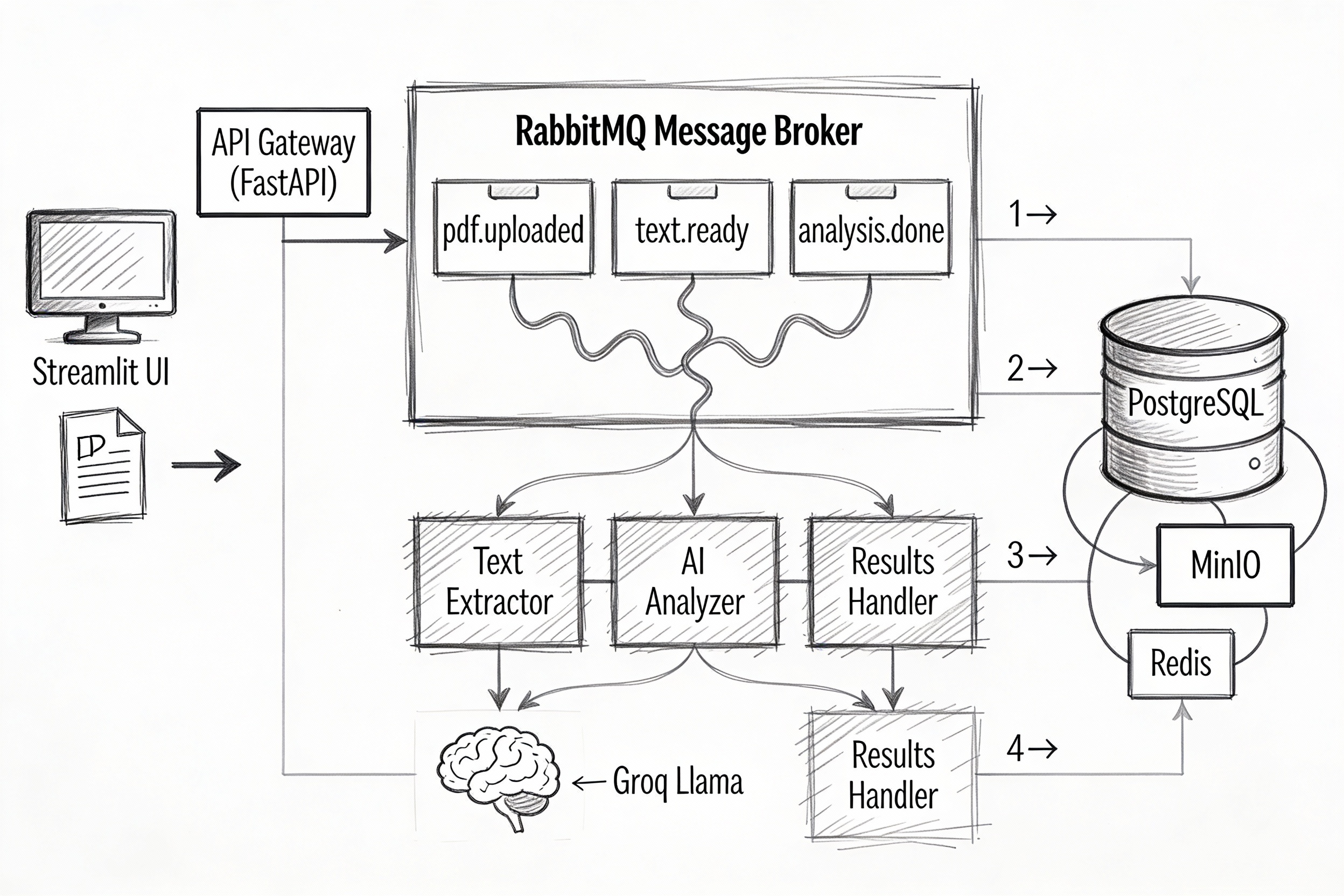
The pipeline orchestrates six specialized microservices through an event-driven workflow:
- Streamlit UI — Users upload PDFs, select analysis types, and view real-time progress without page refreshes.
- API Gateway (FastAPI) — Accepts HTTP uploads, generates job IDs, and returns immediately while processing happens asynchronously.
- PDF Ingestion — Validates files, extracts metadata, stores PDFs in MinIO object storage, and publishes to the
pdf.uploadedqueue. - Text Extractor — Consumes upload events, extracts text with PyPDF2/pdfplumber, handles OCR fallbacks, and publishes to the
text.readyqueue. - AI Analyzer (Groq) — Consumes text events, sends content to Groq's Llama 3.1 or Mixtral models for summarization/classification/Q&A generation, and publishes to the
analysis.donequeue. - Results Handler — Consumes analysis events, persists results to PostgreSQL, caches in Redis, and triggers webhooks for external integrations.
Here is the complete architecture:
┌─────────────────────────────────────────────────────────────────────────────┐
│                    PDF AI ANALYSIS PIPELINE ARCHITECTURE                    │
│              (Python Microservices + Docker + RabbitMQ + Groq)              │
│                         WITH STREAMLIT FRONTEND                             │
└─────────────────────────────────────────────────────────────────────────────┘

┌──────────────────┐
│  STREAMLIT UI    │  (Web Frontend)
│  [Docker:8501]   │  - File upload interface
└────────┬─────────┘  - Real-time status dashboard
         │            - Results visualization
         │ HTTP POST/GET
         │
         ▼
┌─────────────────┐
│   API Gateway   │  (FastAPI)
│  [Docker:8000]  │  - REST endpoints
└────────┬────────┘  - Job management
         │            - SSE for real-time updates
         │
         │ HTTP POST /analyze
         │
         ▼
┌────────────────────┐
│  PDF Ingestion     │  (Python Service)
│   Microservice     │  - Validates PDF
│  [Docker:8001]     │  - Extracts metadata
└─────────┬──────────┘  - Stores in MinIO
          │
          │ Publish: pdf.uploaded
          │
          ▼
┌─────────────────────────────────────────────────────────────────────────┐
│                          RABBITMQ MESSAGE BROKER                        │
│                             [Docker:5672]                               │
│  ┌──────────────┐  ┌──────────────┐  ┌──────────────┐                   │
│  │ pdf.uploaded │  │ text.ready   │  │analysis.done │                   │
│  │    Queue     │  │    Queue     │  │    Queue     │                   │
│  └──────────────┘  └──────────────┘  └──────────────┘                   │
└─────────────────────────────────────────────────────────────────────────┘
          │                   │                   │
          │                   │                   │
   ┌──────▼──────┐    ┌───────▼────────┐   ┌─────▼──────┐
   │   PDF Text  │    │   AI Analysis  │   │  Results   │
   │  Extractor  │    │  Microservice  │   │  Handler   │
   │  Service    │    │    (Groq)      │   │  Service   │
   │[Docker:8002]│    │  [Docker:8003] │   │[Docker:8004]│
   └──────┬──────┘    └────────┬───────┘   └─────┬──────┘
          │                    │                  │
          │ - PyPDF2           │ - Groq API       │ - Store results
          │ - pdfplumber       │ - Llama 3        │ - PostgreSQL
          │ - OCR              │ - Summarization  │ - Redis cache
          │                    │ - Classification │ - Webhooks
          │                    │                  │
          │ Publish:           │ Publish:         │
          │ text.ready         │ analysis.done    │
          │                    │                  │
          └────────────────────┴──────────────────┘
                              │
                              ▼
                    ┌──────────────────┐
                    │   Data Storage   │
                    │                  │
                    │ - PostgreSQL     │  [Docker:5432]
                    │ - MinIO/S3       │  [Docker:9000]
                    │ - Redis Cache    │  [Docker:6379]
                    └──────────────────┘
Message Flow
- User uploads PDF via Streamlit UI → API Gateway
- Ingestion service validates → publishes to
pdf.uploadedqueue - Text Extractor consumes → extracts text → publishes to
text.readyqueue - AI Analyzer consumes → calls Groq API → publishes to
analysis.donequeue - Results Handler consumes → stores results → notifies user
- Streamlit polls API Gateway → displays real-time progress → shows results
Part 1: The Infrastructure
We will start with the foundational layer: orchestrating services with Docker Compose and designing a database schema that supports job tracking, result storage, and caching.
Folder Structure
Treat this as a monorepo. Create the following directory tree:
mkdir pdf-ai-pipeline
cd pdf-ai-pipeline
mkdir services database
mkdir services/streamlit-ui services/api-gateway services/pdf-ingestion
mkdir services/text-extractor services/ai-analyzer services/results-handler
touch docker-compose.yml .env database/init.sql
mkdir pdf-ai-pipeline
cd pdf-ai-pipeline
mkdir services database
mkdir services/streamlit-ui services/api-gateway services/pdf-ingestion
mkdir services/text-extractor services/ai-analyzer services/results-handler
touch docker-compose.yml .env database/init.sql
The Docker Compose File
We need to orchestrate eight core services:
- Streamlit UI — the frontend users interact with.
- API Gateway (FastAPI) — the HTTP entry point for uploads and queries.
- PDF Ingestion, Text Extractor, AI Analyzer, Results Handler — the processing pipeline.
- RabbitMQ — message broker for event-driven communication.
- PostgreSQL — persistent storage for jobs and results.
- Redis — fast caching layer for frequently accessed results.
- MinIO — S3-compatible object storage for raw PDFs.
Open docker-compose.yml and add this configuration:
version: '3.8'

services:
  # Frontend
  streamlit-ui:
    build: ./services/streamlit-ui
    container_name: pdf_ui
    ports:
      - "8501:8501"
    environment:
      - API_URL=http://api-gateway:8000
    networks:
      - pdf-net
    depends_on:
      - api-gateway

  # API Gateway
  api-gateway:
    build: ./services/api-gateway
    container_name: pdf_api
    ports:
      - "8000:8000"
    environment:
      - RABBITMQ_URL=amqp://guest:guest@rabbitmq:5672
      - REDIS_URL=redis://redis:6379
      - POSTGRES_URL=postgresql://admin:secretpassword@postgres:5432/pdf_analysis
      - MINIO_URL=minio:9000
    networks:
      - pdf-net
    depends_on:
      rabbitmq:
        condition: service_healthy
      postgres:
        condition: service_healthy
      redis:
        condition: service_started

  # PDF Ingestion (2 replicas for load balancing)
  pdf-ingestion:
    build: ./services/pdf-ingestion
    environment:
      - RABBITMQ_URL=amqp://guest:guest@rabbitmq:5672
      - MINIO_URL=minio:9000
      - MINIO_ACCESS_KEY=minioadmin
      - MINIO_SECRET_KEY=minioadmin
    networks:
      - pdf-net
    depends_on:
      rabbitmq:
        condition: service_healthy
      minio:
        condition: service_started
    deploy:
      replicas: 2

  # Text Extractor (3 replicas - CPU intensive)
  text-extractor:
    build: ./services/text-extractor
    environment:
      - RABBITMQ_URL=amqp://guest:guest@rabbitmq:5672
    networks:
      - pdf-net
    depends_on:
      rabbitmq:
        condition: service_healthy
    deploy:
      replicas: 3

  # AI Analyzer (2 replicas)
  ai-analyzer:
    build: ./services/ai-analyzer
    environment:
      - RABBITMQ_URL=amqp://guest:guest@rabbitmq:5672
      - GROQ_API_KEY=${GROQ_API_KEY}
    networks:
      - pdf-net
    depends_on:
      rabbitmq:
        condition: service_healthy
    deploy:
      replicas: 2

  # Results Handler
  results-handler:
    build: ./services/results-handler
    environment:
      - RABBITMQ_URL=amqp://guest:guest@rabbitmq:5672
      - POSTGRES_URL=postgresql://admin:secretpassword@postgres:5432/pdf_analysis
      - REDIS_URL=redis://redis:6379
    networks:
      - pdf-net
    depends_on:
      rabbitmq:
        condition: service_healthy
      postgres:
        condition: service_healthy
      redis:
        condition: service_started

  # RabbitMQ with Management UI
  rabbitmq:
    image: rabbitmq:3.12-management
    container_name: pdf_queue
    ports:
      - "5672:5672"
      - "15672:15672"
    environment:
      - RABBITMQ_DEFAULT_USER=guest
      - RABBITMQ_DEFAULT_PASS=guest
    networks:
      - pdf-net
    healthcheck:
      test: ["CMD", "rabbitmq-diagnostics", "-q", "ping"]
      interval: 10s
      timeout: 5s
      retries: 5

  # PostgreSQL for results storage
  postgres:
    image: postgres:15
    container_name: pdf_db
    environment:
      - POSTGRES_DB=pdf_analysis
      - POSTGRES_USER=admin
      - POSTGRES_PASSWORD=secretpassword
    ports:
      - "5432:5432"
    volumes:
      - postgres_data:/var/lib/postgresql/data
      - ./database/init.sql:/docker-entrypoint-initdb.d/init.sql
    networks:
      - pdf-net
    healthcheck:
      test: ["CMD-SHELL", "pg_isready -U admin -d pdf_analysis"]
      interval: 10s
      timeout: 5s
      retries: 5

  # Redis for caching
  redis:
    image: redis:7-alpine
    container_name: pdf_cache
    ports:
      - "6379:6379"
    networks:
      - pdf-net

  # MinIO (S3-compatible storage)
  minio:
    image: minio/minio
    container_name: pdf_storage
    ports:
      - "9000:9000"
      - "9001:9001"
    environment:
      - MINIO_ROOT_USER=minioadmin
      - MINIO_ROOT_PASSWORD=minioadmin
    command: server /data --console-address ":9001"
    volumes:
      - minio_data:/data
    networks:
      - pdf-net

volumes:
  postgres_data:
  minio_data:

networks:
  pdf-net:
    driver: bridge
version: '3.8'

services:
  # Frontend
  streamlit-ui:
    build: ./services/streamlit-ui
    container_name: pdf_ui
    ports:
      - "8501:8501"
    environment:
      - API_URL=http://api-gateway:8000
    networks:
      - pdf-net
    depends_on:
      - api-gateway

  # API Gateway
  api-gateway:
    build: ./services/api-gateway
    container_name: pdf_api
    ports:
      - "8000:8000"
    environment:
      - RABBITMQ_URL=amqp://guest:guest@rabbitmq:5672
      - REDIS_URL=redis://redis:6379
      - POSTGRES_URL=postgresql://admin:secretpassword@postgres:5432/pdf_analysis
      - MINIO_URL=minio:9000
    networks:
      - pdf-net
    depends_on:
      rabbitmq:
        condition: service_healthy
      postgres:
        condition: service_healthy
      redis:
        condition: service_started

  # PDF Ingestion (2 replicas for load balancing)
  pdf-ingestion:
    build: ./services/pdf-ingestion
    environment:
      - RABBITMQ_URL=amqp://guest:guest@rabbitmq:5672
      - MINIO_URL=minio:9000
      - MINIO_ACCESS_KEY=minioadmin
      - MINIO_SECRET_KEY=minioadmin
    networks:
      - pdf-net
    depends_on:
      rabbitmq:
        condition: service_healthy
      minio:
        condition: service_started
    deploy:
      replicas: 2

  # Text Extractor (3 replicas - CPU intensive)
  text-extractor:
    build: ./services/text-extractor
    environment:
      - RABBITMQ_URL=amqp://guest:guest@rabbitmq:5672
    networks:
      - pdf-net
    depends_on:
      rabbitmq:
        condition: service_healthy
    deploy:
      replicas: 3

  # AI Analyzer (2 replicas)
  ai-analyzer:
    build: ./services/ai-analyzer
    environment:
      - RABBITMQ_URL=amqp://guest:guest@rabbitmq:5672
      - GROQ_API_KEY=${GROQ_API_KEY}
    networks:
      - pdf-net
    depends_on:
      rabbitmq:
        condition: service_healthy
    deploy:
      replicas: 2

  # Results Handler
  results-handler:
    build: ./services/results-handler
    environment:
      - RABBITMQ_URL=amqp://guest:guest@rabbitmq:5672
      - POSTGRES_URL=postgresql://admin:secretpassword@postgres:5432/pdf_analysis
      - REDIS_URL=redis://redis:6379
    networks:
      - pdf-net
    depends_on:
      rabbitmq:
        condition: service_healthy
      postgres:
        condition: service_healthy
      redis:
        condition: service_started

  # RabbitMQ with Management UI
  rabbitmq:
    image: rabbitmq:3.12-management
    container_name: pdf_queue
    ports:
      - "5672:5672"
      - "15672:15672"
    environment:
      - RABBITMQ_DEFAULT_USER=guest
      - RABBITMQ_DEFAULT_PASS=guest
    networks:
      - pdf-net
    healthcheck:
      test: ["CMD", "rabbitmq-diagnostics", "-q", "ping"]
      interval: 10s
      timeout: 5s
      retries: 5

  # PostgreSQL for results storage
  postgres:
    image: postgres:15
    container_name: pdf_db
    environment:
      - POSTGRES_DB=pdf_analysis
      - POSTGRES_USER=admin
      - POSTGRES_PASSWORD=secretpassword
    ports:
      - "5432:5432"
    volumes:
      - postgres_data:/var/lib/postgresql/data
      - ./database/init.sql:/docker-entrypoint-initdb.d/init.sql
    networks:
      - pdf-net
    healthcheck:
      test: ["CMD-SHELL", "pg_isready -U admin -d pdf_analysis"]
      interval: 10s
      timeout: 5s
      retries: 5

  # Redis for caching
  redis:
    image: redis:7-alpine
    container_name: pdf_cache
    ports:
      - "6379:6379"
    networks:
      - pdf-net

  # MinIO (S3-compatible storage)
  minio:
    image: minio/minio
    container_name: pdf_storage
    ports:
      - "9000:9000"
      - "9001:9001"
    environment:
      - MINIO_ROOT_USER=minioadmin
      - MINIO_ROOT_PASSWORD=minioadmin
    command: server /data --console-address ":9001"
    volumes:
      - minio_data:/data
    networks:
      - pdf-net

volumes:
  postgres_data:
  minio_data:

networks:
  pdf-net:
    driver: bridge
Environment Variables
Create a .env file to manage secrets:
# Groq API Key (get one free at console.groq.com)
GROQ_API_KEY=your_groq_api_key_here
# Groq API Key (get one free at console.groq.com)
GROQ_API_KEY=your_groq_api_key_here
Designing the Schema
We need to track job lifecycle, store analysis results, and cache frequently accessed data. Open database/init.sql:
-- Jobs Table: Track processing lifecycle
CREATE TABLE IF NOT EXISTS jobs (
    id UUID PRIMARY KEY DEFAULT gen_random_uuid(),
    filename TEXT NOT NULL,
    status TEXT DEFAULT 'pending',  -- pending, extracting, analyzing, completed, failed
    analysis_type TEXT,              -- summary, classification, qa_generation, full
    model TEXT,                      -- llama-3.1-70b, mixtral-8x7b
    created_at TIMESTAMP DEFAULT CURRENT_TIMESTAMP,
    updated_at TIMESTAMP DEFAULT CURRENT_TIMESTAMP
);

-- Results Table: Store analysis output
CREATE TABLE IF NOT EXISTS results (
    id SERIAL PRIMARY KEY,
    job_id UUID REFERENCES jobs(id) ON DELETE CASCADE,
    result_data JSONB NOT NULL,      -- Flexible storage for any AI output
    confidence_score FLOAT,
    created_at TIMESTAMP DEFAULT CURRENT_TIMESTAMP
);

-- Create indexes for fast queries
CREATE INDEX idx_jobs_status ON jobs(status);
CREATE INDEX idx_jobs_created_at ON jobs(created_at DESC);
CREATE INDEX idx_results_job_id ON results(job_id);

-- Enable full-text search on results
CREATE INDEX idx_results_data_gin ON results USING gin(result_data jsonb_path_ops);
Booting Up
Launch the infrastructure:
# Start all services
docker-compose up -d

# Verify services are healthy
docker-compose ps

# View RabbitMQ Management UI at http://localhost:15672 (guest/guest)
# View MinIO Console at http://localhost:9001 (minioadmin/minioadmin)
# Start all services
docker-compose up -d

# Verify services are healthy
docker-compose ps

# View RabbitMQ Management UI at http://localhost:15672 (guest/guest)
# View MinIO Console at http://localhost:9001 (minioadmin/minioadmin)
Part 2: The Backend Services
With infrastructure running, we will now build the four processing microservices that power the pipeline.
Service 1: API Gateway (FastAPI)
This service accepts HTTP uploads and immediately returns a job ID, enabling asynchronous processing.
Create services/api-gateway/requirements.txt:
fastapi
uvicorn
pika
psycopg2-binary
redis
python-multipart
python-dotenv
The code (services/api-gateway/main.py):
from fastapi import FastAPI, UploadFile, File, HTTPException
from fastapi.responses import StreamingResponse
import pika
import psycopg2
import redis
import json
import os
from uuid import uuid4

app = FastAPI(title="PDF Analysis API")

# Connect to Infrastructure
RABBITMQ_URL = os.environ.get("RABBITMQ_URL")
POSTGRES_URL = os.environ.get("POSTGRES_URL")
REDIS_URL = os.environ.get("REDIS_URL")

redis_client = redis.from_url(REDIS_URL)

def get_db():
    return psycopg2.connect(POSTGRES_URL)

def publish_event(queue_name, message):
    connection = pika.BlockingConnection(pika.URLParameters(RABBITMQ_URL))
    channel = connection.channel()
    channel.queue_declare(queue=queue_name, durable=True)
    channel.basic_publish(
        exchange='',
        routing_key=queue_name,
        body=json.dumps(message),
        properties=pika.BasicProperties(delivery_mode=2)
    )
    connection.close()

@app.post("/analyze")
async def analyze_pdf(
    file: UploadFile = File(...),
    analysis_type: str = "summary",
    model: str = "llama-3.1-70b"
):
    job_id = str(uuid4())

    # Store job in database
    conn = get_db()
    cur = conn.cursor()
    cur.execute(
        "INSERT INTO jobs (id, filename, status, analysis_type, model) VALUES (%s, %s, 'pending', %s, %s)",
        (job_id, file.filename, analysis_type, model)
    )
    conn.commit()
    conn.close()

    # Save file temporarily and publish to queue
    file_path = f"/tmp/{job_id}.pdf"
    with open(file_path, "wb") as f:
        f.write(await file.read())

    publish_event("pdf.uploaded", {
        "job_id": job_id,
        "file_path": file_path,
        "filename": file.filename,
        "analysis_type": analysis_type,
        "model": model
    })

    return {"job_id": job_id, "status": "processing"}

@app.get("/status/{job_id}")
def get_status(job_id: str):
    # Check cache first
    cached = redis_client.get(f"job:{job_id}")
    if cached:
        return json.loads(cached)

    # Query database
    conn = get_db()
    cur = conn.cursor()
    cur.execute("SELECT status, filename FROM jobs WHERE id = %s", (job_id,))
    result = cur.fetchone()
    conn.close()

    if not result:
        raise HTTPException(status_code=404, detail="Job not found")

    status_data = {"job_id": job_id, "status": result[0], "filename": result[1]}
    redis_client.setex(f"job:{job_id}", 60, json.dumps(status_data))
    return status_data

@app.get("/results/{job_id}")
def get_results(job_id: str):
    conn = get_db()
    cur = conn.cursor()
    cur.execute(
        "SELECT result_data FROM results WHERE job_id = %s",
        (job_id,)
    )
    result = cur.fetchone()
    conn.close()

    if not result:
        raise HTTPException(status_code=404, detail="Results not found")

    return result[0]

@app.get("/metrics")
def get_metrics():
    conn = get_db()
    cur = conn.cursor()
    cur.execute("SELECT status, COUNT(*) FROM jobs GROUP BY status")
    metrics = dict(cur.fetchall())
    conn.close()
    return metrics

if __name__ == "__main__":
    import uvicorn
    uvicorn.run(app, host="0.0.0.0", port=8000)
from fastapi import FastAPI, UploadFile, File, HTTPException
from fastapi.responses import StreamingResponse
import pika
import psycopg2
import redis
import json
import os
from uuid import uuid4

app = FastAPI(title="PDF Analysis API")

# Connect to Infrastructure
RABBITMQ_URL = os.environ.get("RABBITMQ_URL")
POSTGRES_URL = os.environ.get("POSTGRES_URL")
REDIS_URL = os.environ.get("REDIS_URL")

redis_client = redis.from_url(REDIS_URL)

def get_db():
    return psycopg2.connect(POSTGRES_URL)

def publish_event(queue_name, message):
    connection = pika.BlockingConnection(pika.URLParameters(RABBITMQ_URL))
    channel = connection.channel()
    channel.queue_declare(queue=queue_name, durable=True)
    channel.basic_publish(
        exchange='',
        routing_key=queue_name,
        body=json.dumps(message),
        properties=pika.BasicProperties(delivery_mode=2)
    )
    connection.close()

@app.post("/analyze")
async def analyze_pdf(
    file: UploadFile = File(...),
    analysis_type: str = "summary",
    model: str = "llama-3.1-70b"
):
    job_id = str(uuid4())

    # Store job in database
    conn = get_db()
    cur = conn.cursor()
    cur.execute(
        "INSERT INTO jobs (id, filename, status, analysis_type, model) VALUES (%s, %s, 'pending', %s, %s)",
        (job_id, file.filename, analysis_type, model)
    )
    conn.commit()
    conn.close()

    # Save file temporarily and publish to queue
    file_path = f"/tmp/{job_id}.pdf"
    with open(file_path, "wb") as f:
        f.write(await file.read())

    publish_event("pdf.uploaded", {
        "job_id": job_id,
        "file_path": file_path,
        "filename": file.filename,
        "analysis_type": analysis_type,
        "model": model
    })

    return {"job_id": job_id, "status": "processing"}

@app.get("/status/{job_id}")
def get_status(job_id: str):
    # Check cache first
    cached = redis_client.get(f"job:{job_id}")
    if cached:
        return json.loads(cached)

    # Query database
    conn = get_db()
    cur = conn.cursor()
    cur.execute("SELECT status, filename FROM jobs WHERE id = %s", (job_id,))
    result = cur.fetchone()
    conn.close()

    if not result:
        raise HTTPException(status_code=404, detail="Job not found")

    status_data = {"job_id": job_id, "status": result[0], "filename": result[1]}
    redis_client.setex(f"job:{job_id}", 60, json.dumps(status_data))
    return status_data

@app.get("/results/{job_id}")
def get_results(job_id: str):
    conn = get_db()
    cur = conn.cursor()
    cur.execute(
        "SELECT result_data FROM results WHERE job_id = %s",
        (job_id,)
    )
    result = cur.fetchone()
    conn.close()

    if not result:
        raise HTTPException(status_code=404, detail="Results not found")

    return result[0]

@app.get("/metrics")
def get_metrics():
    conn = get_db()
    cur = conn.cursor()
    cur.execute("SELECT status, COUNT(*) FROM jobs GROUP BY status")
    metrics = dict(cur.fetchall())
    conn.close()
    return metrics

if __name__ == "__main__":
    import uvicorn
    uvicorn.run(app, host="0.0.0.0", port=8000)
The Dockerfile (services/api-gateway/Dockerfile):
FROM python:3.9-slim
WORKDIR /app
COPY requirements.txt .
RUN pip install --no-cache-dir -r requirements.txt
COPY . .
CMD ["python", "main.py"]
Service 2: PDF Ingestion
This service validates PDFs, extracts metadata, and stores files in MinIO.
Create services/pdf-ingestion/requirements.txt:
pika
PyPDF2
minio
python-dotenv
The code (services/pdf-ingestion/worker.py):
import pika
import json
import os
from minio import Minio
from PyPDF2 import PdfReader

RABBITMQ_URL = os.environ.get("RABBITMQ_URL")
MINIO_URL = os.environ.get("MINIO_URL")
MINIO_ACCESS = os.environ.get("MINIO_ACCESS_KEY")
MINIO_SECRET = os.environ.get("MINIO_SECRET_KEY")

minio_client = Minio(MINIO_URL, access_key=MINIO_ACCESS, secret_key=MINIO_SECRET, secure=False)

# Ensure bucket exists
if not minio_client.bucket_exists("pdfs"):
    minio_client.make_bucket("pdfs")

def process_upload(ch, method, properties, body):
    data = json.loads(body)
    job_id = data['job_id']
    file_path = data['file_path']

    try:
        # Validate PDF
        reader = PdfReader(file_path)
        page_count = len(reader.pages)

        # Store in MinIO
        minio_client.fput_object("pdfs", f"{job_id}.pdf", file_path)

        # Publish to next queue
        connection = pika.BlockingConnection(pika.URLParameters(RABBITMQ_URL))
        channel = connection.channel()
        channel.queue_declare(queue="text.extraction", durable=True)
        channel.basic_publish(
            exchange='',
            routing_key="text.extraction",
            body=json.dumps({
                **data,
                "page_count": page_count,
                "minio_path": f"pdfs/{job_id}.pdf"
            }),
            properties=pika.BasicProperties(delivery_mode=2)
        )
        connection.close()

        os.remove(file_path)
        ch.basic_ack(delivery_tag=method.delivery_tag)
        print(f"Processed: {data['filename']}")

    except Exception as e:
        print(f"Error: {e}")
        ch.basic_nack(delivery_tag=method.delivery_tag, requeue=False)

# Start Consumer
connection = pika.BlockingConnection(pika.URLParameters(RABBITMQ_URL))
channel = connection.channel()
channel.queue_declare(queue="pdf.uploaded", durable=True)
channel.basic_qos(prefetch_count=1)
channel.basic_consume(queue="pdf.uploaded", on_message_callback=process_upload)

print("PDF Ingestion Service Started...")
channel.start_consuming()
import pika
import json
import os
from minio import Minio
from PyPDF2 import PdfReader

RABBITMQ_URL = os.environ.get("RABBITMQ_URL")
MINIO_URL = os.environ.get("MINIO_URL")
MINIO_ACCESS = os.environ.get("MINIO_ACCESS_KEY")
MINIO_SECRET = os.environ.get("MINIO_SECRET_KEY")

minio_client = Minio(MINIO_URL, access_key=MINIO_ACCESS, secret_key=MINIO_SECRET, secure=False)

# Ensure bucket exists
if not minio_client.bucket_exists("pdfs"):
    minio_client.make_bucket("pdfs")

def process_upload(ch, method, properties, body):
    data = json.loads(body)
    job_id = data['job_id']
    file_path = data['file_path']

    try:
        # Validate PDF
        reader = PdfReader(file_path)
        page_count = len(reader.pages)

        # Store in MinIO
        minio_client.fput_object("pdfs", f"{job_id}.pdf", file_path)

        # Publish to next queue
        connection = pika.BlockingConnection(pika.URLParameters(RABBITMQ_URL))
        channel = connection.channel()
        channel.queue_declare(queue="text.extraction", durable=True)
        channel.basic_publish(
            exchange='',
            routing_key="text.extraction",
            body=json.dumps({
                **data,
                "page_count": page_count,
                "minio_path": f"pdfs/{job_id}.pdf"
            }),
            properties=pika.BasicProperties(delivery_mode=2)
        )
        connection.close()

        os.remove(file_path)
        ch.basic_ack(delivery_tag=method.delivery_tag)
        print(f"Processed: {data['filename']}")

    except Exception as e:
        print(f"Error: {e}")
        ch.basic_nack(delivery_tag=method.delivery_tag, requeue=False)

# Start Consumer
connection = pika.BlockingConnection(pika.URLParameters(RABBITMQ_URL))
channel = connection.channel()
channel.queue_declare(queue="pdf.uploaded", durable=True)
channel.basic_qos(prefetch_count=1)
channel.basic_consume(queue="pdf.uploaded", on_message_callback=process_upload)

print("PDF Ingestion Service Started...")
channel.start_consuming()
The Dockerfile (services/pdf-ingestion/Dockerfile):
FROM python:3.9-slim
WORKDIR /app
COPY requirements.txt .
RUN pip install --no-cache-dir -r requirements.txt
COPY . .
CMD ["python", "worker.py"]
Service 3: Text Extractor
This service extracts text from PDFs using PyPDF2 or pdfplumber, with OCR fallback.
Create services/text-extractor/requirements.txt:
pika
PyPDF2
pdfplumber
pytesseract
pdf2image
python-dotenv
The code (services/text-extractor/worker.py):
import pika
import json
import os
from PyPDF2 import PdfReader
import pdfplumber

RABBITMQ_URL = os.environ.get("RABBITMQ_URL")

def extract_text(file_path):
    text = ""

    # Try PyPDF2 first
    try:
        reader = PdfReader(file_path)
        for page in reader.pages:
            text += page.extract_text()
    except:
        pass

    # Fallback to pdfplumber if PyPDF2 fails
    if len(text.strip()) < 100:
        with pdfplumber.open(file_path) as pdf:
            for page in pdf.pages:
                text += page.extract_text() or ""

    return text.strip()

def process_extraction(ch, method, properties, body):
    data = json.loads(body)
    job_id = data['job_id']

    try:
        # Download from MinIO (simplified - assume local for demo)
        file_path = f"/tmp/{job_id}.pdf"

        text = extract_text(file_path)

        # Publish to analysis queue
        connection = pika.BlockingConnection(pika.URLParameters(RABBITMQ_URL))
        channel = connection.channel()
        channel.queue_declare(queue="text.ready", durable=True)
        channel.basic_publish(
            exchange='',
            routing_key="text.ready",
            body=json.dumps({
                **data,
                "extracted_text": text
            }),
            properties=pika.BasicProperties(delivery_mode=2)
        )
        connection.close()

        ch.basic_ack(delivery_tag=method.delivery_tag)
        print(f"Extracted text from: {data['filename']}")

    except Exception as e:
        print(f"Error: {e}")
        ch.basic_nack(delivery_tag=method.delivery_tag, requeue=False)

# Start Consumer
connection = pika.BlockingConnection(pika.URLParameters(RABBITMQ_URL))
channel = connection.channel()
channel.queue_declare(queue="text.extraction", durable=True)
channel.basic_qos(prefetch_count=1)
channel.basic_consume(queue="text.extraction", on_message_callback=process_extraction)

print("Text Extractor Service Started...")
channel.start_consuming()
import pika
import json
import os
from PyPDF2 import PdfReader
import pdfplumber

RABBITMQ_URL = os.environ.get("RABBITMQ_URL")

def extract_text(file_path):
    text = ""

    # Try PyPDF2 first
    try:
        reader = PdfReader(file_path)
        for page in reader.pages:
            text += page.extract_text()
    except:
        pass

    # Fallback to pdfplumber if PyPDF2 fails
    if len(text.strip()) < 100:
        with pdfplumber.open(file_path) as pdf:
            for page in pdf.pages:
                text += page.extract_text() or ""

    return text.strip()

def process_extraction(ch, method, properties, body):
    data = json.loads(body)
    job_id = data['job_id']

    try:
        # Download from MinIO (simplified - assume local for demo)
        file_path = f"/tmp/{job_id}.pdf"

        text = extract_text(file_path)

        # Publish to analysis queue
        connection = pika.BlockingConnection(pika.URLParameters(RABBITMQ_URL))
        channel = connection.channel()
        channel.queue_declare(queue="text.ready", durable=True)
        channel.basic_publish(
            exchange='',
            routing_key="text.ready",
            body=json.dumps({
                **data,
                "extracted_text": text
            }),
            properties=pika.BasicProperties(delivery_mode=2)
        )
        connection.close()

        ch.basic_ack(delivery_tag=method.delivery_tag)
        print(f"Extracted text from: {data['filename']}")

    except Exception as e:
        print(f"Error: {e}")
        ch.basic_nack(delivery_tag=method.delivery_tag, requeue=False)

# Start Consumer
connection = pika.BlockingConnection(pika.URLParameters(RABBITMQ_URL))
channel = connection.channel()
channel.queue_declare(queue="text.extraction", durable=True)
channel.basic_qos(prefetch_count=1)
channel.basic_consume(queue="text.extraction", on_message_callback=process_extraction)

print("Text Extractor Service Started...")
channel.start_consuming()
The Dockerfile (services/text-extractor/Dockerfile):
FROM python:3.9-slim
RUN apt-get update && apt-get install -y tesseract-ocr && rm -rf /var/lib/apt/lists/*
WORKDIR /app
COPY requirements.txt .
RUN pip install --no-cache-dir -r requirements.txt
COPY . .
CMD ["python", "worker.py"]
Service 4: AI Analyzer (Groq)
This is where Groq delivers high-speed inference for document analysis.
Create services/ai-analyzer/requirements.txt:
pika
groq
python-dotenv
The code (services/ai-analyzer/worker.py):
import pika
import json
import os
from groq import Groq

RABBITMQ_URL = os.environ.get("RABBITMQ_URL")
GROQ_API_KEY = os.environ.get("GROQ_API_KEY")

client = Groq(api_key=GROQ_API_KEY)

def analyze_text(text, analysis_type, model):
    prompts = {
        "summary": "Provide a concise summary of this document in 3-5 bullet points.",
        "classification": "Classify this document by type and main topics.",
        "qa_generation": "Generate 5 question-answer pairs from this document.",
        "full": "Provide a comprehensive analysis including summary, key entities, and main themes."
    }

    prompt = prompts.get(analysis_type, prompts["summary"])

    response = client.chat.completions.create(
        model=model,
        messages=[
            {"role": "system", "content": "You are a helpful document analysis assistant."},
            {"role": "user", "content": f"{prompt}\n\nDocument:\n{text[:8000]}"}
        ],
        temperature=0.3
    )

    return response.choices[0].message.content

def process_analysis(ch, method, properties, body):
    data = json.loads(body)
    job_id = data['job_id']

    try:
        result = analyze_text(
            data['extracted_text'],
            data['analysis_type'],
            data['model']
        )

        # Publish results
        connection = pika.BlockingConnection(pika.URLParameters(RABBITMQ_URL))
        channel = connection.channel()
        channel.queue_declare(queue="analysis.done", durable=True)
        channel.basic_publish(
            exchange='',
            routing_key="analysis.done",
            body=json.dumps({
                "job_id": job_id,
                "result": result
            }),
            properties=pika.BasicProperties(delivery_mode=2)
        )
        connection.close()

        ch.basic_ack(delivery_tag=method.delivery_tag)
        print(f"Analyzed: {data['filename']}")

    except Exception as e:
        print(f"Error: {e}")
        ch.basic_nack(delivery_tag=method.delivery_tag, requeue=False)

# Start Consumer
connection = pika.BlockingConnection(pika.URLParameters(RABBITMQ_URL))
channel = connection.channel()
channel.queue_declare(queue="text.ready", durable=True)
channel.basic_qos(prefetch_count=1)
channel.basic_consume(queue="text.ready", on_message_callback=process_analysis)

print("AI Analyzer Service Started...")
channel.start_consuming()
import pika
import json
import os
from groq import Groq

RABBITMQ_URL = os.environ.get("RABBITMQ_URL")
GROQ_API_KEY = os.environ.get("GROQ_API_KEY")

client = Groq(api_key=GROQ_API_KEY)

def analyze_text(text, analysis_type, model):
    prompts = {
        "summary": "Provide a concise summary of this document in 3-5 bullet points.",
        "classification": "Classify this document by type and main topics.",
        "qa_generation": "Generate 5 question-answer pairs from this document.",
        "full": "Provide a comprehensive analysis including summary, key entities, and main themes."
    }

    prompt = prompts.get(analysis_type, prompts["summary"])

    response = client.chat.completions.create(
        model=model,
        messages=[
            {"role": "system", "content": "You are a helpful document analysis assistant."},
            {"role": "user", "content": f"{prompt}\n\nDocument:\n{text[:8000]}"}
        ],
        temperature=0.3
    )

    return response.choices[0].message.content

def process_analysis(ch, method, properties, body):
    data = json.loads(body)
    job_id = data['job_id']

    try:
        result = analyze_text(
            data['extracted_text'],
            data['analysis_type'],
            data['model']
        )

        # Publish results
        connection = pika.BlockingConnection(pika.URLParameters(RABBITMQ_URL))
        channel = connection.channel()
        channel.queue_declare(queue="analysis.done", durable=True)
        channel.basic_publish(
            exchange='',
            routing_key="analysis.done",
            body=json.dumps({
                "job_id": job_id,
                "result": result
            }),
            properties=pika.BasicProperties(delivery_mode=2)
        )
        connection.close()

        ch.basic_ack(delivery_tag=method.delivery_tag)
        print(f"Analyzed: {data['filename']}")

    except Exception as e:
        print(f"Error: {e}")
        ch.basic_nack(delivery_tag=method.delivery_tag, requeue=False)

# Start Consumer
connection = pika.BlockingConnection(pika.URLParameters(RABBITMQ_URL))
channel = connection.channel()
channel.queue_declare(queue="text.ready", durable=True)
channel.basic_qos(prefetch_count=1)
channel.basic_consume(queue="text.ready", on_message_callback=process_analysis)

print("AI Analyzer Service Started...")
channel.start_consuming()
The Dockerfile (services/ai-analyzer/Dockerfile):
FROM python:3.9-slim
WORKDIR /app
COPY requirements.txt .
RUN pip install --no-cache-dir -r requirements.txt
COPY . .
CMD ["python", "worker.py"]
Service 5: Results Handler
The final service persists results to PostgreSQL and caches in Redis.
Create services/results-handler/requirements.txt:
pika
psycopg2-binary
redis
python-dotenv
The code (services/results-handler/worker.py):
import pika
import json
import os
import psycopg2
import redis

RABBITMQ_URL = os.environ.get("RABBITMQ_URL")
POSTGRES_URL = os.environ.get("POSTGRES_URL")
REDIS_URL = os.environ.get("REDIS_URL")

redis_client = redis.from_url(REDIS_URL)

def get_db():
    return psycopg2.connect(POSTGRES_URL)

def store_results(ch, method, properties, body):
    data = json.loads(body)
    job_id = data['job_id']

    try:
        conn = get_db()
        cur = conn.cursor()

        # Store result
        cur.execute(
            "INSERT INTO results (job_id, result_data) VALUES (%s, %s)",
            (job_id, json.dumps({"analysis": data['result']}))
        )

        # Update job status
        cur.execute(
            "UPDATE jobs SET status = 'completed', updated_at = CURRENT_TIMESTAMP WHERE id = %s",
            (job_id,)
        )

        conn.commit()
        conn.close()

        # Invalidate cache
        redis_client.delete(f"job:{job_id}")

        ch.basic_ack(delivery_tag=method.delivery_tag)
        print(f"Stored results for: {job_id}")

    except Exception as e:
        print(f"Error: {e}")
        ch.basic_nack(delivery_tag=method.delivery_tag, requeue=False)

# Start Consumer
connection = pika.BlockingConnection(pika.URLParameters(RABBITMQ_URL))
channel = connection.channel()
channel.queue_declare(queue="analysis.done", durable=True)
channel.basic_qos(prefetch_count=1)
channel.basic_consume(queue="analysis.done", on_message_callback=store_results)

print("Results Handler Service Started...")
channel.start_consuming()
import pika
import json
import os
import psycopg2
import redis

RABBITMQ_URL = os.environ.get("RABBITMQ_URL")
POSTGRES_URL = os.environ.get("POSTGRES_URL")
REDIS_URL = os.environ.get("REDIS_URL")

redis_client = redis.from_url(REDIS_URL)

def get_db():
    return psycopg2.connect(POSTGRES_URL)

def store_results(ch, method, properties, body):
    data = json.loads(body)
    job_id = data['job_id']

    try:
        conn = get_db()
        cur = conn.cursor()

        # Store result
        cur.execute(
            "INSERT INTO results (job_id, result_data) VALUES (%s, %s)",
            (job_id, json.dumps({"analysis": data['result']}))
        )

        # Update job status
        cur.execute(
            "UPDATE jobs SET status = 'completed', updated_at = CURRENT_TIMESTAMP WHERE id = %s",
            (job_id,)
        )

        conn.commit()
        conn.close()

        # Invalidate cache
        redis_client.delete(f"job:{job_id}")

        ch.basic_ack(delivery_tag=method.delivery_tag)
        print(f"Stored results for: {job_id}")

    except Exception as e:
        print(f"Error: {e}")
        ch.basic_nack(delivery_tag=method.delivery_tag, requeue=False)

# Start Consumer
connection = pika.BlockingConnection(pika.URLParameters(RABBITMQ_URL))
channel = connection.channel()
channel.queue_declare(queue="analysis.done", durable=True)
channel.basic_qos(prefetch_count=1)
channel.basic_consume(queue="analysis.done", on_message_callback=store_results)

print("Results Handler Service Started...")
channel.start_consuming()
The Dockerfile (services/results-handler/Dockerfile):
FROM python:3.9-slim
WORKDIR /app
COPY requirements.txt .
RUN pip install --no-cache-dir -r requirements.txt
COPY . .
CMD ["python", "worker.py"]
Part 3: The Streamlit Frontend
The UI provides an intuitive interface for uploads, real-time monitoring, and result visualization.
Create services/streamlit-ui/requirements.txt:
streamlit
requests
python-dotenv
The code (services/streamlit-ui/app.py):
import streamlit as st
import requests
import time
import json

API_URL = "http://api-gateway:8000"

st.set_page_config(page_title="PDF AI Analysis", layout="wide")
st.title("PDF AI Analysis Pipeline")

tab1, tab2, tab3 = st.tabs(["Upload & Analyze", "Dashboard", "History"])

# TAB 1: Upload
with tab1:
    uploaded_file = st.file_uploader("Upload PDF", type=["pdf"])

    col1, col2 = st.columns(2)
    with col1:
        analysis_type = st.selectbox(
            "Analysis Type",
            ["summary", "classification", "qa_generation", "full"]
        )
    with col2:
        model = st.selectbox("Model", ["llama-3.1-70b", "mixtral-8x7b"])

    if st.button("Start Analysis") and uploaded_file:
        with st.spinner("Uploading..."):
            files = {"file": uploaded_file}
            data = {"analysis_type": analysis_type, "model": model}
            response = requests.post(f"{API_URL}/analyze", files=files, data=data)
            job_id = response.json()["job_id"]

            st.success(f"Job started: {job_id}")

            # Poll for status
            progress_bar = st.progress(0)
            status_text = st.empty()

            while True:
                status_response = requests.get(f"{API_URL}/status/{job_id}")
                status = status_response.json()["status"]
                status_text.text(f"Status: {status}")

                if status == "completed":
                    progress_bar.progress(100)
                    results = requests.get(f"{API_URL}/results/{job_id}").json()
                    st.json(results)
                    break
                elif status == "failed":
                    st.error("Analysis failed")
                    break

                progress_bar.progress(50)
                time.sleep(2)

# TAB 2: Dashboard
with tab2:
    metrics = requests.get(f"{API_URL}/metrics").json()

    col1, col2, col3 = st.columns(3)
    col1.metric("Total Jobs", sum(metrics.values()))
    col2.metric("Completed", metrics.get("completed", 0))
    col3.metric("Failed", metrics.get("failed", 0))

# TAB 3: History
with tab3:
    st.write("Coming soon: Job history and search")
import streamlit as st
import requests
import time
import json

API_URL = "http://api-gateway:8000"

st.set_page_config(page_title="PDF AI Analysis", layout="wide")
st.title("PDF AI Analysis Pipeline")

tab1, tab2, tab3 = st.tabs(["Upload & Analyze", "Dashboard", "History"])

# TAB 1: Upload
with tab1:
    uploaded_file = st.file_uploader("Upload PDF", type=["pdf"])

    col1, col2 = st.columns(2)
    with col1:
        analysis_type = st.selectbox(
            "Analysis Type",
            ["summary", "classification", "qa_generation", "full"]
        )
    with col2:
        model = st.selectbox("Model", ["llama-3.1-70b", "mixtral-8x7b"])

    if st.button("Start Analysis") and uploaded_file:
        with st.spinner("Uploading..."):
            files = {"file": uploaded_file}
            data = {"analysis_type": analysis_type, "model": model}
            response = requests.post(f"{API_URL}/analyze", files=files, data=data)
            job_id = response.json()["job_id"]

            st.success(f"Job started: {job_id}")

            # Poll for status
            progress_bar = st.progress(0)
            status_text = st.empty()

            while True:
                status_response = requests.get(f"{API_URL}/status/{job_id}")
                status = status_response.json()["status"]
                status_text.text(f"Status: {status}")

                if status == "completed":
                    progress_bar.progress(100)
                    results = requests.get(f"{API_URL}/results/{job_id}").json()
                    st.json(results)
                    break
                elif status == "failed":
                    st.error("Analysis failed")
                    break

                progress_bar.progress(50)
                time.sleep(2)

# TAB 2: Dashboard
with tab2:
    metrics = requests.get(f"{API_URL}/metrics").json()

    col1, col2, col3 = st.columns(3)
    col1.metric("Total Jobs", sum(metrics.values()))
    col2.metric("Completed", metrics.get("completed", 0))
    col3.metric("Failed", metrics.get("failed", 0))

# TAB 3: History
with tab3:
    st.write("Coming soon: Job history and search")
The Dockerfile (services/streamlit-ui/Dockerfile):
FROM python:3.9-slim
WORKDIR /app
COPY requirements.txt .
RUN pip install --no-cache-dir -r requirements.txt
COPY . .
EXPOSE 8501
CMD ["streamlit", "run", "app.py", "--server.port=8501", "--server.address=0.0.0.0"]
Final Integration: Launch Day
Running the Stack
Build and run:
docker-compose up -d --build
docker-compose up -d --build
- Access the UI: open
http://localhost:8501 - Upload a PDF: select analysis type and model, then watch real-time processing
- Monitor queues: visit RabbitMQ Management at
http://localhost:15672
You have just built a production-grade PDF analysis pipeline. The system scales horizontally, handles failures gracefully through RabbitMQ acknowledgments, and leverages Groq's inference speed for real-time document processing.
- Scalability — add replicas to any service independently based on bottlenecks.
- Cost efficiency — Groq's API is 10-100x faster than alternatives, reducing processing time and costs.
- User experience — Streamlit provides immediate feedback while processing happens asynchronously in the background.
This architecture demonstrates the power of event-driven microservices and local-first AI integration. Each service owns a single responsibility, communicates through well-defined message contracts, and can be developed and deployed independently by different teams.
Happy coding!