BFF Architecture on Azure Container Apps
TL;DR
The BFF pattern puts a thin API layer between your frontend and your backend microservices. Your React SPA talks to one endpoint. The BFF handles auth, aggregation, and data shaping — so your backend services stay general-purpose and your frontend never fetches data it doesn't need.
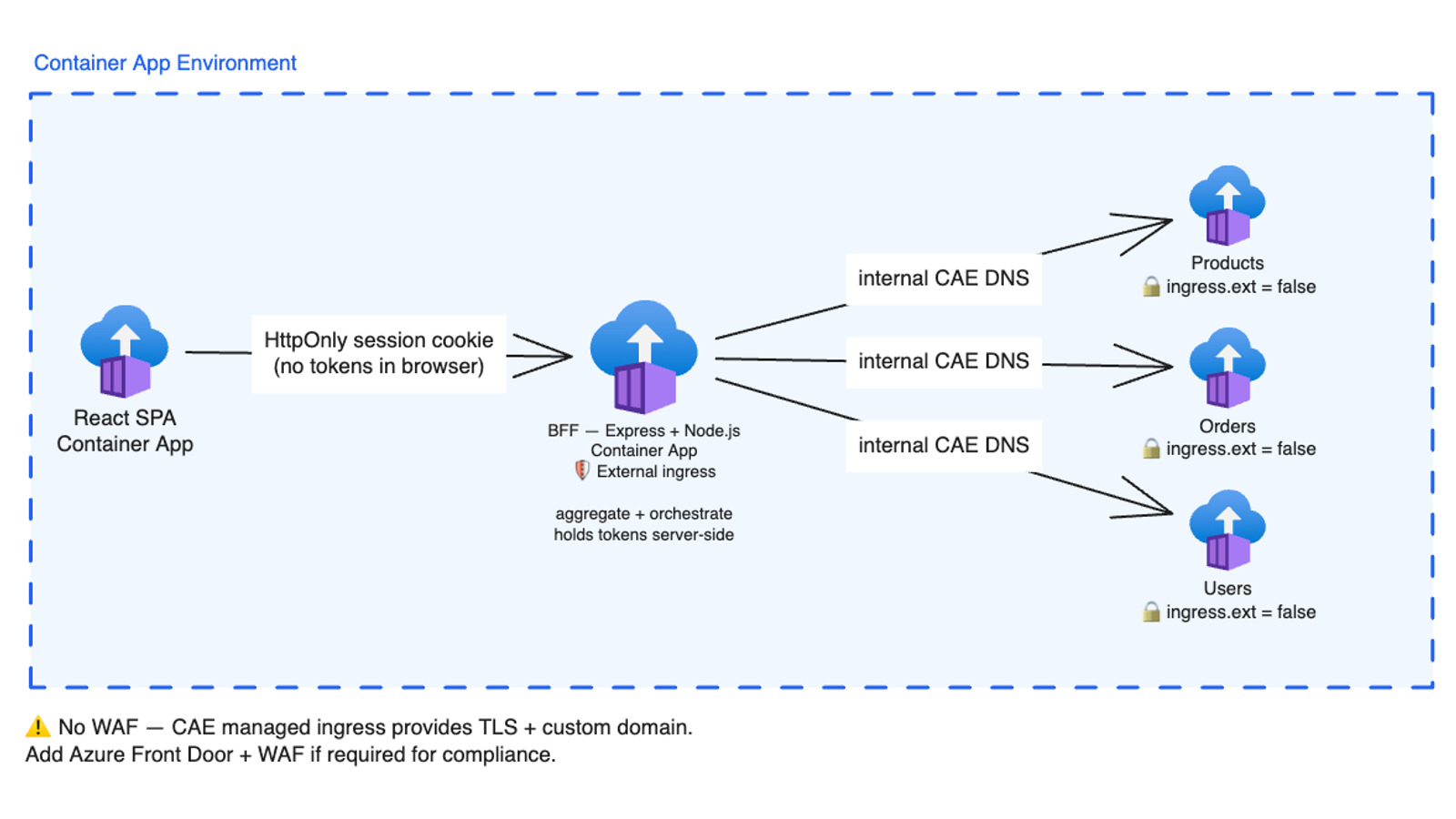
This article walks through one on Azure Container Apps: a single Container App Environment, one external ingress on the BFF, three internal-only backend services, and server-side token handling via Entra ID.
The Backend-for-Frontend (BFF) pattern solves a specific problem: your backend APIs should not be shaped by your frontend's rendering needs. When your web client, mobile app, and third-party integrations all talk to the same backend endpoints, one of two things happens — either every response grows to include data nobody asked for, or each client has to stitch together several calls to render a single screen.
A BFF is a per-client middleware layer. It lives between your frontend and your backend services and handles the transformations specific to that client. Your backend services stay pure — they expose domain operations. Your frontend stays fast — it makes one call per view.
What problem does BFF solve?
Without a BFF, every frontend feature that needs data from multiple services triggers multiple round trips from the browser:
This creates three compounding problems:
- Latency. The browser pays the round-trip cost separately for each service. On mobile networks, three serial calls can add seconds to a page load.
- Over-fetching. Each backend service returns its full domain model. The frontend only needs a handful of fields from each — but it has to download everything anyway.
- Distributed auth. Every backend service must independently validate the user's token. If your auth scheme changes, every service needs a coordinated update.
With a BFF in between:
The browser makes one call. The BFF orchestrates the backend calls server-side — fast, within the Azure data centre — aggregates the responses, trims the payload to exactly what the component needs, and sends it back. Auth is validated once, at the BFF boundary.
Architecture overview
Everything runs inside a single Container App Environment (CAE). This is Azure's managed hosting boundary for groups of container apps that share a virtual network, internal DNS, and observability infrastructure.
The key design decisions:
- Only the BFF has external ingress. The three backend services are configured with internal ingress only — they have no public endpoint and cannot be reached from outside the CAE. The browser can never call them directly.
- The React SPA is also a container app. It sits inside the same environment and communicates with the BFF via an HttpOnly session cookie — no tokens ever reach the browser.
- Backend services reach each other over internal CAE DNS. No API Management layer, no load balancer between the BFF and its downstream services — just private hostnames within the shared virtual network.
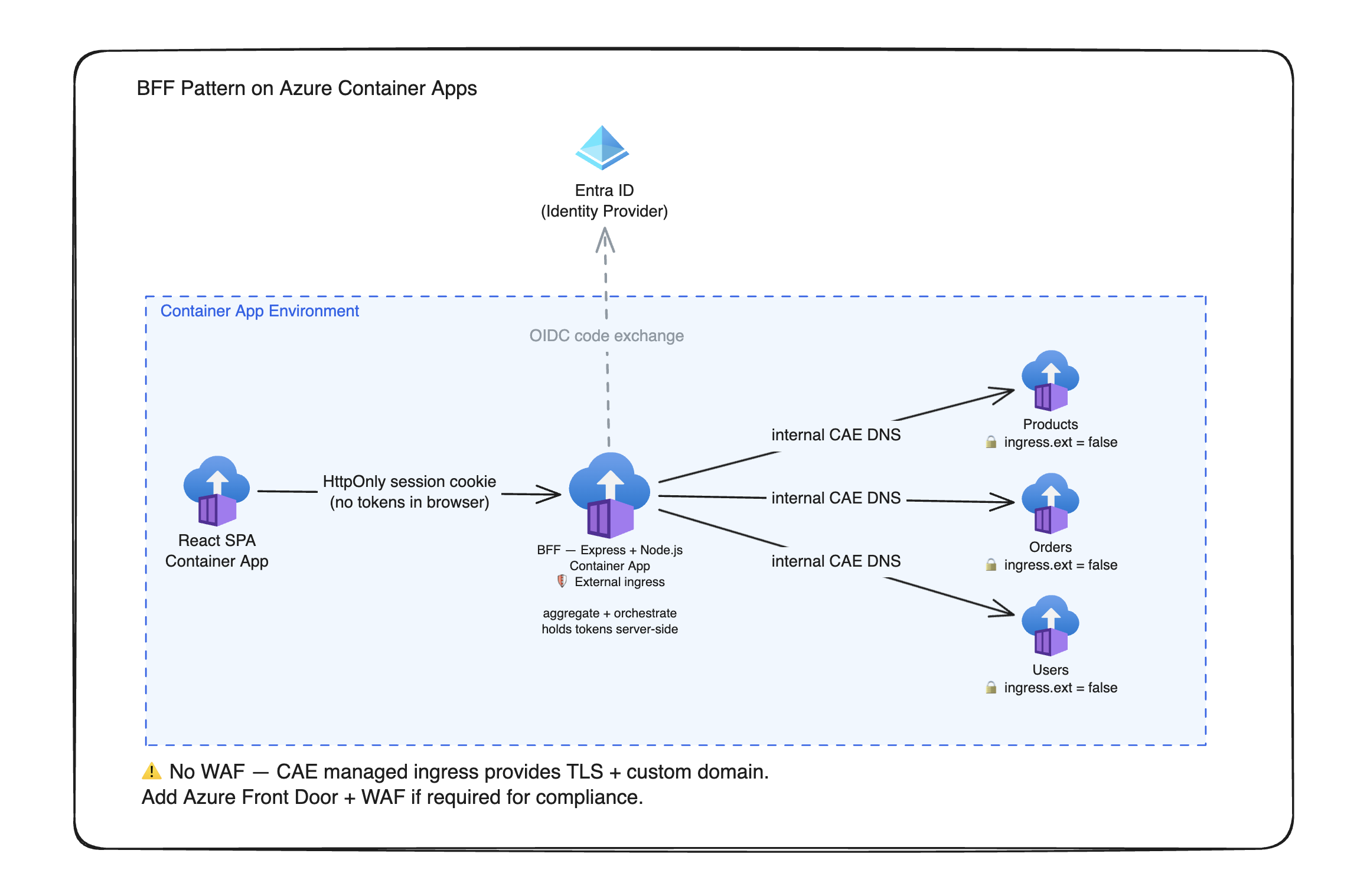 All container apps inside a single CAE, one external ingress on the BFF, internal-only backend services, and token isolation at the SPA↔BFF boundary.
The auth pattern — tokens stay server-side
The most important thing the BFF does for security is keep tokens off the browser entirely. Here is how that works:
Login (OIDC code exchange). When a user signs in, the BFF performs the full OAuth 2.0 authorization code flow with Entra ID server-side. Entra ID issues an access token and a refresh token — but both are stored in the BFF's server-side session store (backed by something like Redis in production), never sent to the browser.
Session cookie. The BFF issues the browser a single HttpOnly session cookie. This cookie contains only an opaque session identifier — a random string that maps to the server-side session. Because it is HttpOnly, JavaScript running in the browser cannot read it. Because it is not a token, there is nothing an attacker can decode if it leaks.
Per-request validation. On every subsequent request, the browser sends the session cookie. The BFF looks up the session ID, retrieves the stored access token, validates it, and — if the token has expired — silently refreshes it using the stored refresh token. The browser never participates in the refresh flow and never sees the new token.
Backend services. When the BFF calls a downstream service, it can attach the access token as a bearer header on the internal request. The backend service validates the token normally. The crucial point: the token travels only over the private CAE network, never over the public internet and never through the browser.
This pattern is sometimes called the Token Handler pattern. The BFF acts as a secure token proxy — the client thinks in sessions, the backend thinks in tokens, and the BFF bridges the two.
How the BFF aggregates and shapes data
The BFF's other job is eliminating the N+1 round-trip problem. Consider a dashboard that needs the user's profile, their recent orders, and a product list to resolve order line items. Without a BFF, the browser makes three separate requests and joins the data client-side. With a BFF:
- The browser makes one request to the BFF's dashboard endpoint, sending only the session cookie.
- The BFF fans out all three backend calls in parallel — it does not wait for Products to respond before calling Orders. Total network time is determined by the slowest call, not the sum of all three.
- The BFF joins the results — matching order line items to product names — entirely server-side over internal CAE DNS, which is orders of magnitude faster than a browser doing the same join over the public internet.
- The BFF returns a single shaped payload containing exactly the fields the dashboard component renders: a greeting, an order count, a short list of recent orders with resolved product names, and a cart item count. Nothing more.
The frontend component receives a pre-joined view model. It does not filter, it does not join, it does not page through a generic list. This is what keeps frontend components simple and avoids the proliferation of client-side data-transformation logic.
Request flow
Notice that the BFF only contacts Entra ID inside the opt block — and only to refresh an expired access token, not on every request. The initial OIDC code exchange happened once, at login. The rest of the time the BFF validates the session locally and proceeds straight to the backend calls.
Internal networking — no gateway needed
A Container App Environment gives every container app inside it a private DNS name matching its app name. The BFF can reach the Products service simply by calling http://products — Azure resolves that to the correct internal endpoint automatically.
This has a few useful consequences:
- No API Management layer required between the BFF and its backend services. Within the CAE, service-to-service calls are private, cheap, and fast.
- No service discovery configuration. App names are hostnames. If you rename a service, update the BFF's reference to that hostname — nothing else changes.
- Backend services are not addressable from outside the CAE. Their ingress is set to internal-only. There is no public IP, no DNS record outside the environment, and no way for an external client to reach them even if they tried.
The only surface exposed to the internet is the BFF's external ingress endpoint. Azure Container Apps managed ingress handles TLS termination and custom domain binding for that endpoint. There is no WAF by default — if your compliance requirements demand one (HIPAA, SOC 2, PCI), you would place Azure Front Door or Application Gateway in front of the BFF.
Caching at the BFF layer
Because the BFF aggregates calls that the browser used to make individually, it is also in the ideal position to cache them. Data that changes infrequently — product catalogues, user profiles — can be cached in the BFF's memory (or in a Redis cache for multi-instance deployments) with a short TTL, so repeated frontend requests do not re-hit the backend services on every page load.
The caching strategy should be selective:
- Static-ish data (product lists, reference data): a few minutes TTL is safe.
- User-specific data (profile, recent orders): either a very short TTL or no caching — and always scope the cache key to the user's identity, not just the URL, to avoid serving one user's data to another.
- Personalised aggregate views (the dashboard itself): do not cache the assembled view model, since it is composed of user-specific data. Cache the individual downstream calls that feed into it instead.
Deploying on Azure Container Apps
The infrastructure is straightforward in Bicep. You define one managed environment resource — this is the CAE that hosts everything. Then you define one container app per service, all pointing at the same environment.
The critical difference between the BFF and the backend services is the ingress configuration:
- BFF:
ingress.external = true, which gives it a public HTTPS endpoint that the browser and Entra ID can reach. - Products, Orders, Users:
ingress.external = false, which makes them reachable only within the CAE over internal DNS.
The BFF container app also receives the Entra tenant ID and client ID as environment variables. These are used to construct the OIDC endpoints and to validate tokens — they are not secrets (the client secret is), so passing them as plain env vars in the Bicep template is fine. The client secret itself should be stored in Azure Key Vault and injected via a Key Vault reference, not hardcoded.
Deploying is a single az deployment group create command pointing at the Bicep template, passing the app name, Entra tenant ID, and Entra client ID as parameters.
When BFF is the right call
| Scenario | BFF helps? | Why |
|---|---|---|
| Web + mobile sharing backend APIs | Yes | Each client gets its own BFF, shaped for its rendering model |
| Legacy monolith with a new SPA frontend | Yes | The BFF acts as an adapter — you don't refactor the monolith |
| Simple CRUD app, one frontend | No | The extra layer adds latency and complexity for no benefit |
| Public API with third-party consumers | No | Those consumers want the full domain model, not a view model |
| Microservices with per-screen orchestration | Yes | Prevents N+1 round trips from the browser to N services |
Rule of thumb: if your frontend makes three or more API calls to render one screen, or you have multiple distinct client types, a BFF pays for itself in reduced complexity. If you have one frontend and one backend, skip it.
Common pitfalls
-
BFF becomes a monolith. Each route handler in the BFF should be thin — orchestration only, no business logic. Business rules stay in the backend services. If the BFF is making decisions about pricing or inventory, something has gone wrong with the boundary.
-
Shared BFF for web and mobile. The whole point is per-client specialisation. A shared BFF defeats the purpose — a mobile home screen needs a different data shape than a web dashboard. Run separate BFF container apps, one per client type.
-
No timeouts on backend calls. If one backend service hangs, it will hold the BFF handler open for the duration of the default HTTP timeout. Every downstream call from the BFF should have an explicit timeout. Partial failure handling — returning a degraded response when one service is slow — is also worth building in early.
-
Accidentally exposing a backend service. It is easy to deploy a new container app and forget to set its ingress to internal-only. If a backend service gets an external ingress, the entire token-isolation design is bypassed — the browser could call it directly. A deployment policy or CI gate that audits ingress configuration is worth adding before you go to production.
-
No WAF by default. Azure Container Apps managed ingress provides TLS termination and custom domains, but not an application-layer firewall. If your workload requires WAF protection, place Azure Front Door or Application Gateway in front of the BFF and configure WAF rules there.
-
Over-fetching still happens inside the BFF. Backend calls within the CAE may return large objects when the BFF only needs a few fields. This is usually fine — the call is fast and internal — but worth keeping an eye on if payload sizes grow. The backend service is the right place to add field projection if it becomes a problem.
Further reading
- Backends for Frontends pattern — the canonical write-up in the Azure Architecture Center.
- Azure Container Apps overview — what a Container App Environment is and how apps run inside it.
- Ingress in Azure Container Apps — external vs. internal ingress, the flag that keeps backend services private.
- Microsoft identity platform — OAuth 2.0 authorization code flow — the Entra ID flow the BFF runs server-side at login.
- The Token Handler pattern — the security pattern behind keeping tokens server-side and handing the browser only a cookie.